AI-generated LinkedIn posts with OpenAI, Google Sheets & email approval workflow
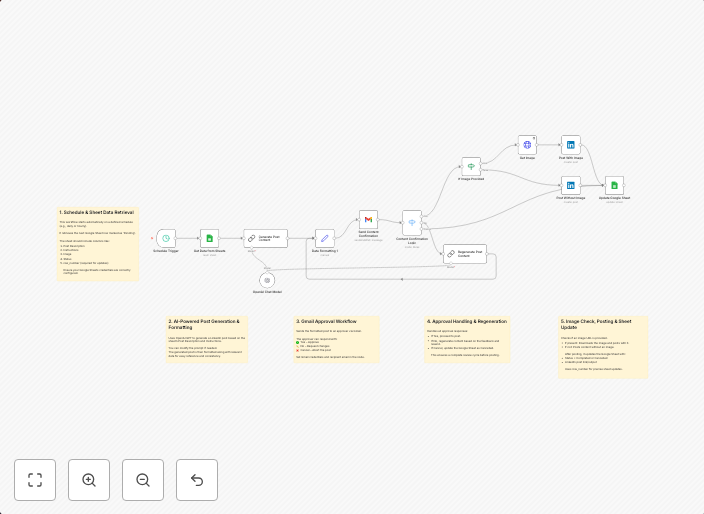
How it worksThis workflow automates the process of creating, approving, and optionally posting LinkedIn content from a Google Sheet. Here's a high-level...
Get This WorkflowAbout This Workflow
What This Workflow Does
This workflow automates the process of generating AI-driven LinkedIn posts using OpenAI, storing them in a Google Sheet, and obtaining email approval before posting the content. It streamlines the content creation and approval process, saving time and effort for users. This workflow is ideal for marketers and business owners who want to leverage AI-powered content creation and maintain quality control.
Who Should Use This
This workflow is designed for marketers, business owners, and social media managers who want to create and publish high-quality LinkedIn content efficiently. It is particularly useful for those who have a large team or need to manage multiple social media accounts.
Key Features
- AI-generated content: Uses OpenAI to create compelling LinkedIn post content based on user input from a Google Sheet.
- Email approval workflow: Allows for email approval of generated content, ensuring that only high-quality content is posted.
- Google Sheet integration: Stores generated content in a Google Sheet for easy review and management.
- Optional posting: Allows users to optionally post the approved content directly to LinkedIn.
How to Get Started
To get started with this workflow, import it into your n8n account and customize the settings to fit your specific needs, including connecting your Google Sheet and email account. Then, use the workflow to generate and approve AI-driven LinkedIn posts, streamlining your content creation process.
Use This Workflow in n8n →Similar Workflows




Affiliate Disclosure: We may earn a commission if you sign up for n8n through our links. This doesn't affect our recommendations.