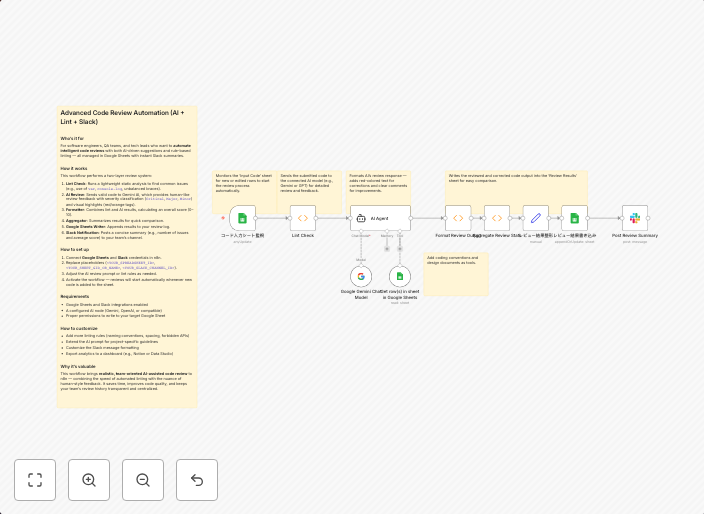
AI-powered code review with linting, red-marked corrections in Google Sheets & Slack
Advanced Code Review Automation (AI + Lint + Slack) Who’s it forFor software engineers, QA teams, and tech leads who want to automate intelligent code...
Get This WorkflowAbout This Workflow
What This Workflow Does
This automation workflow combines AI-powered code review, linting, and real-time feedback in Google Sheets and Slack. It helps developers improve code quality and identify issues quickly, streamlining the code review process. By automating this process, teams can save time and focus on more complex tasks.
Who Should Use This
This workflow is ideal for software engineers, QA teams, and tech leads who want to automate intelligent code reviews, improve collaboration, and enhance overall code quality.
Key Features
- AI-powered code review: Uses machine learning to analyze code and provide actionable feedback.
- Linting and error detection: Automatically checks code for errors, warnings, and best practices.
- Real-time feedback in Google Sheets: Updates a Google Sheet in real-time with red-marked corrections and suggestions.
- Integrates with Slack: Sends notifications and code review updates to team members via Slack.
How to Get Started
To use this workflow, import it into your n8n account and customize the nodes to fit your team's specific needs. This may include setting up Google Sheets and Slack integrations, as well as configuring the AI-powered code review settings.
Use This Workflow in n8n →Similar Workflows




Affiliate Disclosure: We may earn a commission if you sign up for n8n through our links. This doesn't affect our recommendations.