Analyze customer review sentiment automatically with Google Sheets
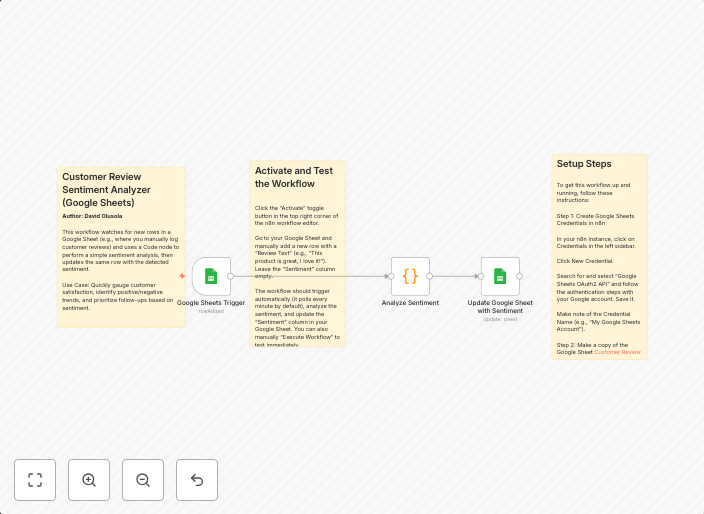
OverviewThis workflow watches for new rows in a Google Sheet (e.g., where you manually log customer reviews) and uses a Code node to perform a simple...
Get This WorkflowAbout This Workflow
What This Workflow Does
This workflow automatically analyzes the sentiment of customer reviews stored in a Google Sheet, providing a quick overview of customer feedback. It does this by continuously monitoring the sheet for new rows and using a code node to perform a sentiment analysis. This helps businesses stay on top of customer opinions and make informed decisions.
Who Should Use This
This workflow is ideal for business owners, marketers, and customer success teams who want to quickly and easily track customer sentiment and feedback. It's also suitable for developers looking to automate a specific task within their business.
Key Features
- Continuous Monitoring: The workflow watches for new rows in the Google Sheet and updates the analysis in real-time.
- Sentiment Analysis: Uses a code node to perform a simple sentiment analysis on the customer reviews.
- Automated Insights: Provides a quick overview of customer feedback, helping businesses make informed decisions.
How to Get Started
To get started with this workflow, simply import it into your n8n account and connect your Google Sheet to the workflow. Customize the settings as needed to fit your specific use case, and start analyzing customer sentiment automatically.
Use This Workflow in n8n →Similar Workflows




Affiliate Disclosure: We may earn a commission if you sign up for n8n through our links. This doesn't affect our recommendations.