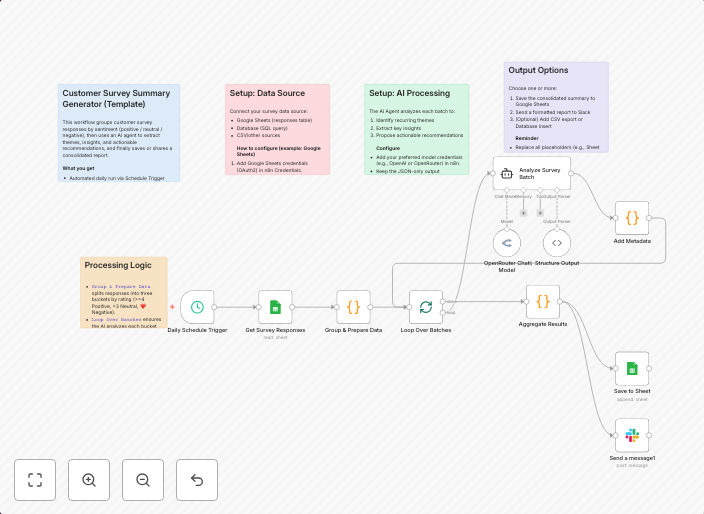
Analyze customer survey feedback with AI, Google Sheets & Slack reports
Here’s a clean, English-only template description you can paste into the n8n “Description” field. Overview This workflow analyzes customer survey responses,...
Get This WorkflowAbout This Workflow
What This Workflow Does
This workflow analyzes customer survey feedback using AI-powered summarization, stores the insights in a Google Sheets report, and sends a summary to a Slack channel, providing actionable data for businesses to improve their products and services.
Who Should Use This
This workflow is ideal for marketing teams, business owners, and product managers looking to streamline their customer feedback analysis and gain valuable insights to inform their decision-making.
Key Features
- AI-Powered Summarization: Automatically extracts key points from customer survey responses using AI-powered tools.
- Google Sheets Reporting: Stores the summarized insights in a Google Sheets report for easy reference and further analysis.
- Slack Notifications: Sends a summary of the findings to a designated Slack channel, ensuring all stakeholders are informed.
How to Get Started
To use this workflow, import it into your n8n instance and configure the Google Sheets and Slack integrations to match your account credentials. Customize the workflow settings to suit your specific use case and survey data requirements.
Use This Workflow in n8n →Similar Workflows




Affiliate Disclosure: We may earn a commission if you sign up for n8n through our links. This doesn't affect our recommendations.