Analyze trending YouTube videos with Apify, OpenAI, and Google Sheets
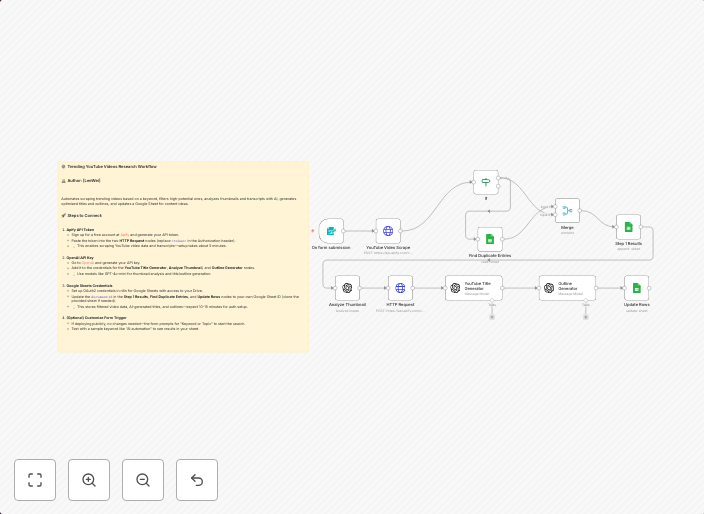
⚙️ Trending YouTube Videos Research Workflow: 🧑💻 Author: [Leewei] Automates scraping trending videos based on a keyword, filters high-potential ones,...
Get This WorkflowAbout This Workflow
What This Workflow Does
This n8n automation workflow analyzes trending YouTube videos using Apify, OpenAI, and Google Sheets. It scrapes videos based on a keyword, filters high-potential ones, and provides insights on their potential. The workflow automates market research for businesses and marketers interested in YouTube trends.
Who Should Use This
This workflow is ideal for developers, marketers, and business owners looking to automate market research and analyze YouTube trends. It can be particularly useful for e-commerce businesses, content creators, and social media managers.
Key Features
- Apify YouTube Scraping: Scrapes trending YouTube videos based on a keyword.
- OpenAI Sentiment Analysis: Analyzes the sentiment and potential of each video.
- Google Sheets Integration: Stores the results in a Google Sheet for easy access and analysis.
How to Get Started
To use this workflow, simply import it into n8n and customize the keyword and other settings to suit your research needs. Make sure to set up the necessary integrations with Apify, OpenAI, and Google Sheets to access the workflow's full functionality.
Use This Workflow in n8n →Similar Workflows




Affiliate Disclosure: We may earn a commission if you sign up for n8n through our links. This doesn't affect our recommendations.