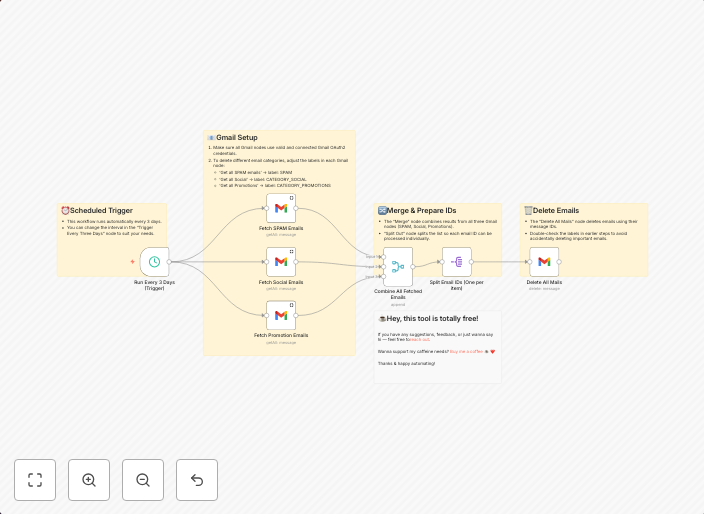
Auto-Delete SPAM, Social, and Promotions Emails in Gmail
Who is this for?This workflow is perfect for Gmail users who want a tidy inbox without manual effort. It’s especially great for those overwhelmed by SPAM,...
Get This WorkflowAbout This Workflow
Auto-Delete SPAM, Social, and Promotions Emails in Gmail
This workflow automatically deletes unwanted emails from your Gmail inbox, keeping your inbox tidy without manual effort.
What This Workflow Does
This n8n automation workflow connects to your Gmail account and sets up rules to automatically delete emails marked as SPAM, Social, or Promotions. It helps you quickly get rid of unwanted emails, reducing clutter and saving time.
Who Should Use This
This workflow is perfect for Gmail users who want to maintain a clean and organized inbox without manually sifting through unwanted emails. It's especially great for individuals overwhelmed by SPAM, social media promotional emails, and promotional content.
Key Features
- Automatically deletes emails marked as SPAM
- Removes Social emails
- Deletes Promotions emails
- Seamlessly integrates with Gmail
How to Get Started
Import this workflow into your n8n dashboard and connect it to your Gmail account. Customize the workflow settings to ensure it deletes the correct types of emails and meets your specific needs.
Use This Workflow in n8n →Similar Workflows




Affiliate Disclosure: We may earn a commission if you sign up for n8n through our links. This doesn't affect our recommendations.