Auto-draft professional email replies with Gmail, AI, and Slack
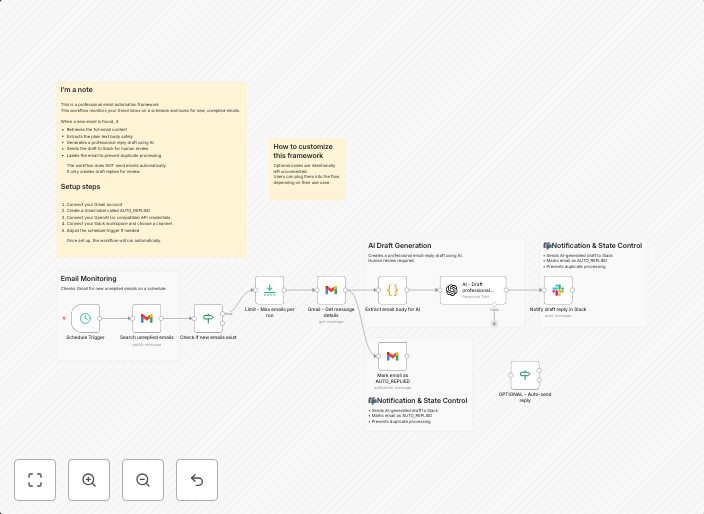
What this workflow does This workflow monitors your Gmail inbox for new, unreplied emails and automatically generates a professional reply draft using AI....
Get This WorkflowAbout This Workflow
What This Workflow Does
This workflow automates the process of generating professional email replies using AI, making it ideal for teams and individuals who need to respond promptly to customer inquiries. It monitors new, unreplied emails in your Gmail inbox and creates a draft reply based on the conversation. This helps reduce the time spent on responding to emails, allowing you to focus on other tasks.
Who Should Use This
This workflow is suitable for businesses, customer support teams, and individuals who rely heavily on email communication, such as marketers, sales teams, and developers.
Key Features
- Automated Email Monitoring: Monitors your Gmail inbox for new, unreplied emails and triggers the workflow to create a draft reply.
- AI-Generated Replies: Uses AI to generate professional and relevant reply drafts based on the conversation.
- Integration with Slack: Allows you to send the draft reply to Slack for further review and approval.
- Customizable: Can be customized to fit your company's tone and style.
How to Get Started
To use this workflow, simply import it into your n8n account and customize the settings to match your company's Gmail and Slack configurations. From there, you can set up the workflow to automatically trigger on new, unreplied emails, and start receiving AI-generated reply drafts in your Slack workspace.
Use This Workflow in n8n →Similar Workflows




Affiliate Disclosure: We may earn a commission if you sign up for n8n through our links. This doesn't affect our recommendations.