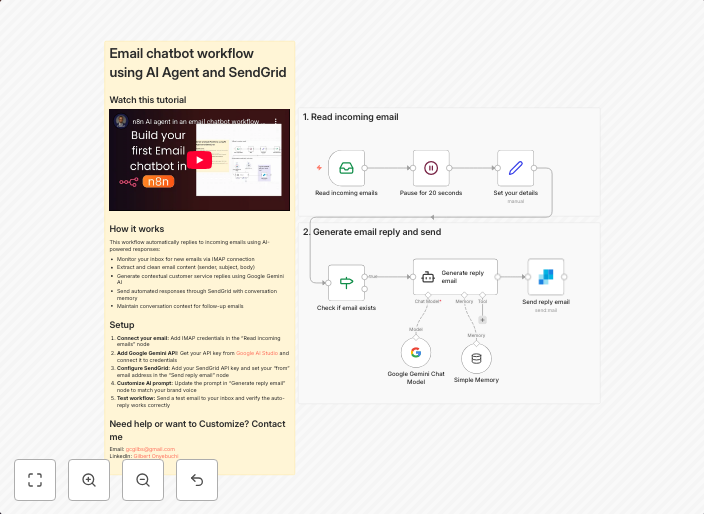
Auto-reply to emails using Google Gemini AI and SendGrid
Transform your inbox into an intelligent assistant! This workflow automatically reads incoming emails, generates personalized AI responses using Google...
Get This WorkflowAbout This Workflow
What This Workflow Does
This workflow automatically replies to incoming emails using Google Gemini AI to generate personalized responses. It integrates with SendGrid to send the AI-generated responses to the email sender. By automating email responses, users can save time and provide instant support to their customers or colleagues.
Who Should Use This
This workflow is suitable for business owners, customer support teams, and marketing professionals who want to leverage AI-powered automation to improve customer experience and response times.
Key Features
- AI-powered email responses: Generates personalized responses using Google Gemini AI, reducing the need for manual email composition.
- Automated reply: Instantly responds to incoming emails, ensuring timely support and improving customer satisfaction.
- SendGrid integration: Utilizes SendGrid to send AI-generated responses to the email sender, ensuring seamless delivery.
- No manual intervention required: Automates the entire process, saving time and resources for more critical tasks.
How to Get Started
To use this workflow, simply import it into your n8n account and customize the settings to fit your specific needs. Configure the Google Gemini AI and SendGrid integrations according to your account credentials and preferences. With minimal setup, you can transform your inbox into a smart assistant that provides instant support to your customers or colleagues.
Use This Workflow in n8n →Similar Workflows




Affiliate Disclosure: We may earn a commission if you sign up for n8n through our links. This doesn't affect our recommendations.