Automate client invoicing & payments with Stripe, Google Sheets, Drive and Gmail
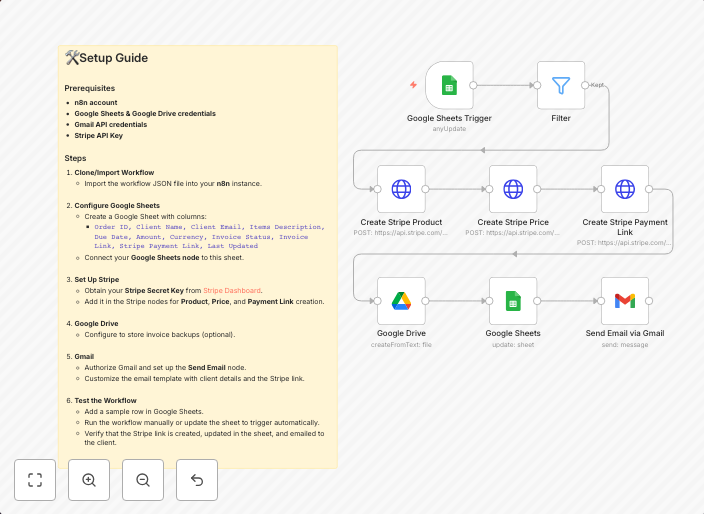
Google Sheets → Stripe Payment Automation Workflow 📌 Overview This workflow automates the end-to-end process of generating and sending client payment links...
Get This WorkflowAbout This Workflow
Automate Client Invoicing & Payments with Stripe, Google Sheets, Drive, and Gmail
This workflow automatically generates and sends client payment links, streamlining the end-to-end process of invoicing and payment processing. It connects Google Sheets, Stripe, Google Drive, and Gmail to create a seamless experience. With this automation, you can save time and reduce errors in managing client payments.
This workflow is ideal for entrepreneurs, business owners, and professionals who use Google Sheets and Stripe for managing client payments. It's perfect for anyone looking to automate repetitive tasks and increase efficiency in their financial operations.
- Automated Invoicing: Generates payment links in Google Sheets and sends them to clients via Gmail.
- Stripe Integration: Processes payments and updates client records in Google Sheets.
- Google Drive Storage: Saves invoices and payment receipts in Google Drive for easy access.
- Customizable Templates: Allows you to create and customize invoice templates in Google Sheets.
To start using this workflow, simply import it into your n8n account and customize the settings to fit your specific business needs. You can then set up the workflow to automate the invoicing and payment process for your clients.
Use This Workflow in n8n →Similar Workflows




Affiliate Disclosure: We may earn a commission if you sign up for n8n through our links. This doesn't affect our recommendations.