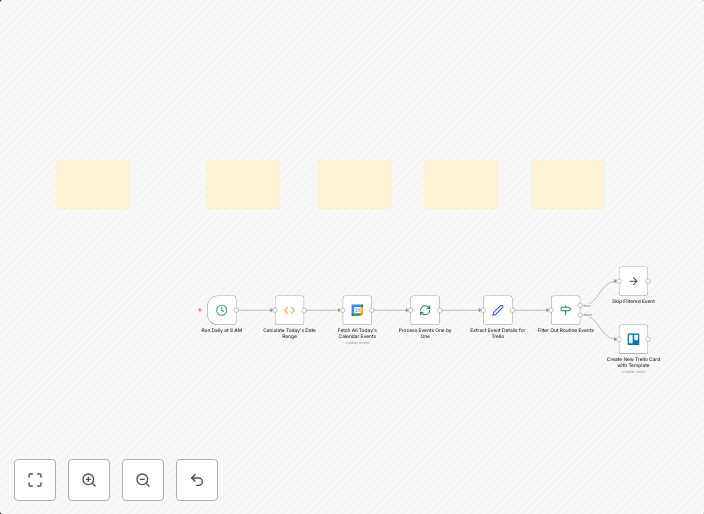
Automate daily Google Calendar events to Trello cards
📋 Overview This n8n workflow automatically converts your Google Calendar events for the current day into Trello cards every morning at 8 AM. It fetches all...
Get This WorkflowAbout This Workflow
What This Workflow Does
This n8n automation workflow connects to your Google Calendar and fetches all events scheduled for the current day. Every morning at 8 AM, it automatically converts these events into Trello cards, making it easy to manage your tasks and stay organized. This integration helps streamline your project management workflow.
Who Should Use This
This workflow is ideal for project managers, team leaders, and business owners who rely on Google Calendar for scheduling and Trello for task management. It's also suitable for anyone looking to automate tasks and increase productivity.
Key Features
- Daily Event Fetching: The workflow fetches all events scheduled for the current day from Google Calendar.
- Trello Card Creation: The workflow automatically creates Trello cards for each event, making it easy to track and manage tasks.
- Scheduled Automation: The workflow runs every morning at 8 AM, ensuring that your Trello cards are up-to-date and reflect your current schedule.
- Seamless Integration: The workflow integrates seamlessly with Google Calendar and Trello, eliminating the need for manual data entry.
How to Get Started
To import and customize this workflow in n8n, simply click the "Import Workflow" button and follow the prompts. You can then adjust the workflow settings to suit your specific needs, such as changing the schedule or adjusting the Trello card creation rules.
Use This Workflow in n8n →Similar Workflows




Affiliate Disclosure: We may earn a commission if you sign up for n8n through our links. This doesn't affect our recommendations.