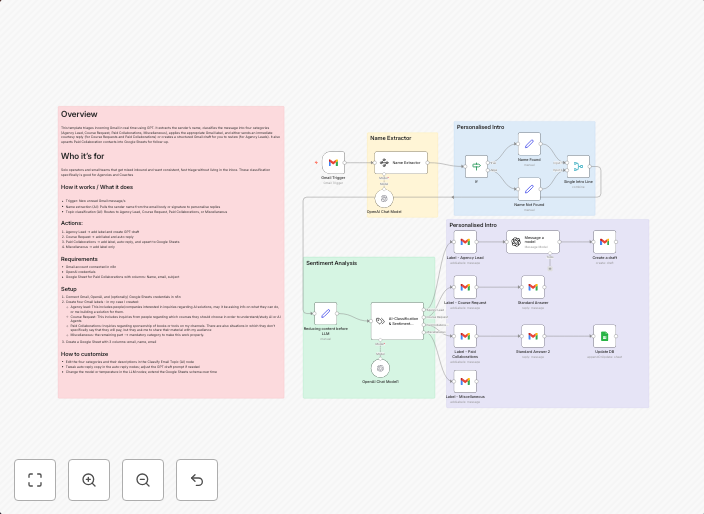
Automate email triage with GPT-4.1-mini classification and Gmail auto-replies
How it works:Detects new unread Gmail messagesExtracts sender name for personalized repliesClassifies the email into one of four categoriesApplies the...
Get This WorkflowAbout This Workflow
What This Workflow Does
This workflow automates the process of email triage by leveraging GPT-4.1-mini classification and Gmail auto-replies. It detects new unread Gmail messages, extracts the sender's name for personalized replies, and classifies emails into one of four categories. The workflow then applies the appropriate auto-replies based on the classification.
Who Should Use This
This workflow is ideal for business owners, marketing teams, or customer support teams who want to streamline their email management and improve response times to customer inquiries.
Key Features
- Detects new unread Gmail messages for timely classification and auto-replies
- Extracts sender name for personalized and efficient email responses
- Classifies emails into one of four categories for accurate routing
- Applies auto-replies based on email classification to reduce response times
How to Get Started
To use this workflow, simply import it into n8n and customize the Gmail and GPT-4.1-mini integrations to match your email account credentials. You can then adjust the classification categories and auto-replies to suit your business needs.
Use This Workflow in n8n →Similar Workflows




Affiliate Disclosure: We may earn a commission if you sign up for n8n through our links. This doesn't affect our recommendations.