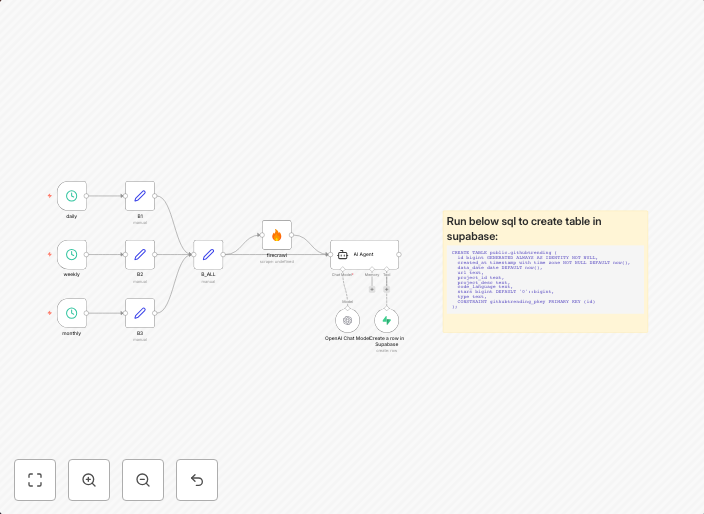
Automate GitHub trending data collection with FireCrawl, GPT and Supabase
GitHub Trending to Supabase (Daily, Weekly, Monthly) Who is this for? This workflow is for developers, researchers, founders, and data analysts who want a...
Get This WorkflowAbout This Workflow
What This Workflow Does
This workflow automates the collection of GitHub trending data, utilizing FireCrawl, GPT, and Supabase to fetch and store data on a daily, weekly, and monthly basis. By leveraging these tools, users can easily access and analyze trending GitHub repositories. The workflow provides a streamlined process for data collection and storage.
Who Should Use This
This workflow is suitable for developers, researchers, founders, and data analysts who want to stay up-to-date with GitHub's trending repositories and analyze the data for insights and trends.
Key Features
- Collects GitHub trending data on a daily, weekly, and monthly basis
- Utilizes FireCrawl for data fetching and GPT for advanced data analysis
- Stores data in Supabase for easy access and analysis
- Offers a customizable solution for users to tailor the workflow to their specific needs
How to Get Started
To use this workflow, simply import it into your n8n account and customize the settings to suit your requirements. You can also modify the workflow to integrate with other tools and services as needed.
Use This Workflow in n8n →Similar Workflows




Affiliate Disclosure: We may earn a commission if you sign up for n8n through our links. This doesn't affect our recommendations.