Automate incident reporting & alerts with forms, Google Sheets and Gmail
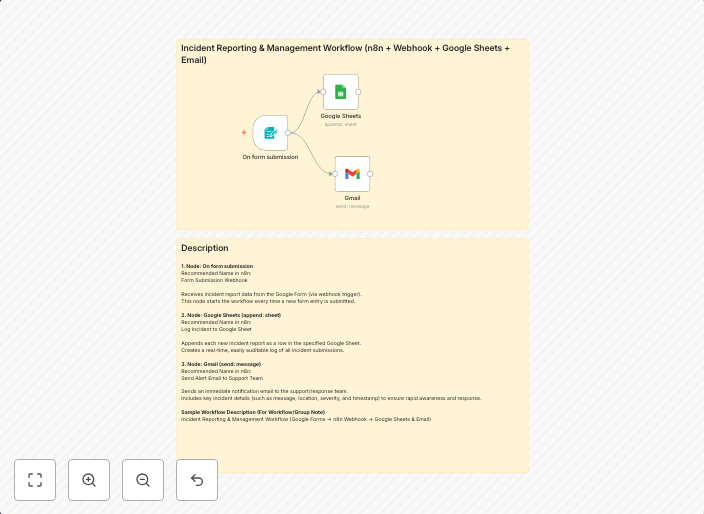
Incident Reporting & Management Workflow (Form + Google Sheets + Email) This workflow automates incident reporting and management for operations teams by...
Get This WorkflowAbout This Workflow
What This Workflow Does
This workflow automates the process of incident reporting and management by collecting incident reports from forms, storing them in Google Sheets, and sending alerts to relevant teams via Gmail. It streamlines operations teams' workflows, reducing manual effort and response time. This automation ensures that incident reports are accurately tracked and communicated in real-time.
Who Should Use This
This workflow is ideal for operations teams, IT departments, and organizations that rely on efficient incident reporting and management to maintain business continuity.
Key Features
- Collects incident reports from forms and stores them in Google Sheets for centralized tracking.
- Sends automated alerts to relevant teams via Gmail, ensuring timely responses to incidents.
- Automates data transfer between forms, Google Sheets, and Gmail, reducing manual errors and effort.
- Allows for customizable workflows to fit specific incident reporting and management needs.
How to Get Started
To use this workflow, simply import it into your n8n instance and customize the settings to fit your organization's specific incident reporting and management requirements. You can then connect your forms, Google Sheets, and Gmail accounts to automate the workflow and start streamlining your incident reporting process.
Use This Workflow in n8n →Similar Workflows




Affiliate Disclosure: We may earn a commission if you sign up for n8n through our links. This doesn't affect our recommendations.