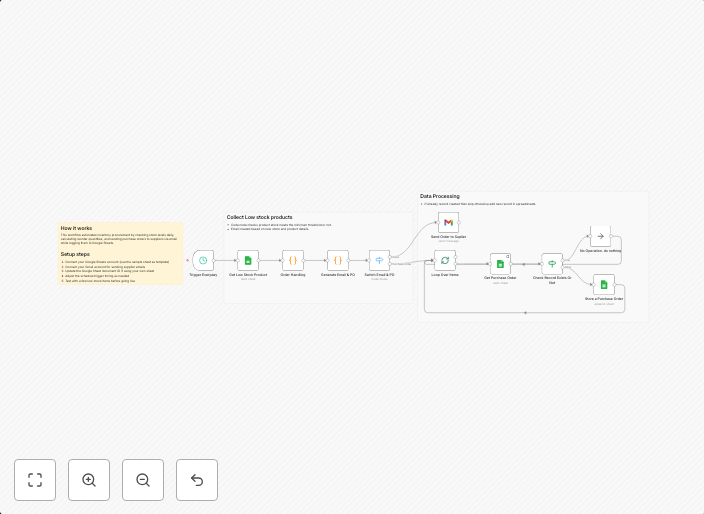
Automate inventory management with Google Sheets & Gmail
✅ What problem does this workflow solve? Managing inventory manually requires constant monitoring, manual purchase order creation, and back-and-forth...
Get This WorkflowAbout This Workflow
Automate Inventory Management with Google Sheets & Gmail
What This Workflow Does
This workflow automates inventory management by connecting Google Sheets and Gmail, eliminating the need for manual monitoring and purchase order creation. It streamlines the process of tracking inventory levels, receiving notifications when stock is low, and automatically generating purchase orders when necessary. This automation saves time and reduces errors.
Who Should Use This
This workflow is ideal for business owners, inventory managers, and supply chain professionals looking to optimize their inventory management processes and reduce manual workload.
Key Features
- Automated Low-Stock Notifications: Receive Gmail notifications when inventory levels reach a specified threshold.
- Purchase Order Generation: Automatically create purchase orders in Gmail when inventory levels are low.
- Inventory Tracking: Real-time updates in Google Sheets provide accurate and up-to-date inventory levels.
- Data Integration: Seamlessly syncs inventory data between Google Sheets and Gmail.
How to Get Started
To use this workflow, simply import it into n8n, customize the settings to suit your inventory management needs, and connect your Google Sheets and Gmail accounts. With this automation, you can enjoy a more efficient and streamlined inventory management process.
Use This Workflow in n8n →Similar Workflows




Affiliate Disclosure: We may earn a commission if you sign up for n8n through our links. This doesn't affect our recommendations.