Automate lead intake & deduplication with Google Forms, Sheets and GoHighLevel CRM
Description: Eliminate duplicate entries and streamline your lead management process with this n8n workflow template! Automatically capture new form...
Get This WorkflowAbout This Workflow
What This Workflow Does
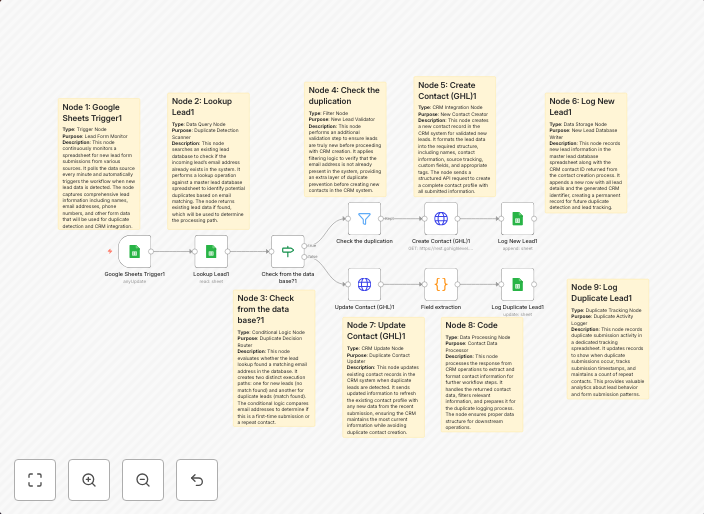
This workflow template automates the process of capturing new leads from Google Forms, checking for duplicates in Google Sheets, and importing valid leads to GoHighLevel CRM. It eliminates manual data entry and saves time by automatically deduplicating and updating lead information. This streamlined process ensures accurate and up-to-date lead management.
Who Should Use This
This workflow is suitable for business owners, marketers, and sales teams who rely on Google Forms and GoHighLevel CRM to manage their lead generation and sales processes. It's ideal for anyone looking to automate and optimize their lead intake and deduplication process.
Key Features
- Automated Lead Capture: Capture new leads from Google Forms and store them in Google Sheets.
- Duplicate Detection: Check for duplicate leads in Google Sheets and prevent duplicate imports to GoHighLevel CRM.
- CRM Integration: Automatically import valid leads to GoHighLevel CRM, ensuring accurate and up-to-date lead management.
- Error Handling: Handles errors and exceptions, providing a robust and reliable automation process.
How to Get Started
To use this workflow, simply import it into your n8n account and customize the settings to match your Google Forms, Google Sheets, and GoHighLevel CRM configurations. Follow the in-app instructions to connect your accounts and start automating your lead intake and deduplication process today.
Use This Workflow in n8n →Similar Workflows




Affiliate Disclosure: We may earn a commission if you sign up for n8n through our links. This doesn't affect our recommendations.