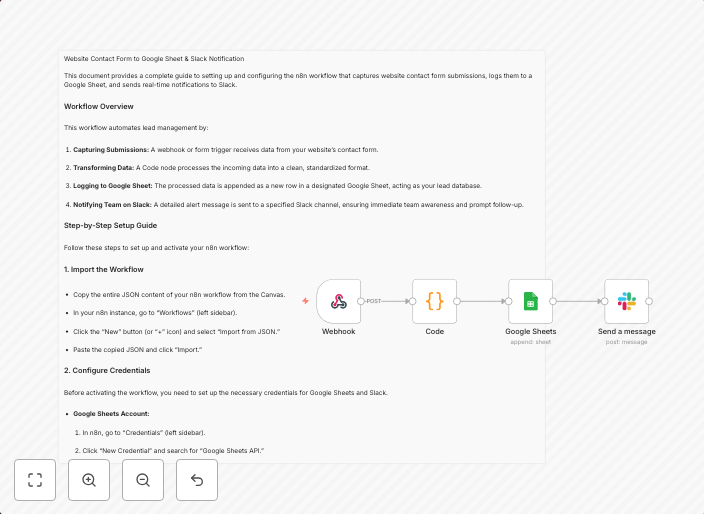
Automate lead management from website forms to Google Sheets and Slack
🧠 Workflow Summary Automates lead management by: 🔗 Webhook Trigger: Captures form data from your website.🧼 Code Node: Standardizes the data format.📄...
Get This WorkflowAbout This Workflow
What This Workflow Does
This workflow automates lead management by capturing form data from your website through a webhook trigger, standardizing the data format using a code node, and then sending the lead information to Google Sheets for record-keeping and Slack for real-time notifications.
Who Should Use This
This workflow is ideal for marketers, business owners, and developers who want to streamline their lead management process and stay on top of new leads with minimal manual effort.
Key Features
- Webhook Trigger: Captures form data from your website in real-time.
- Data Standardization: Uses a code node to standardize the data format for easier analysis and processing.
- Google Sheets Integration: Sends lead information to Google Sheets for record-keeping and long-term storage.
- Slack Notifications: Sends real-time notifications to Slack channels for immediate lead updates.
How to Get Started
To get started, import this workflow into your n8n account and customize it to fit your specific lead management needs by connecting your website's webhook, setting up your Google Sheets integration, and configuring your Slack notification settings.
Use This Workflow in n8n →Similar Workflows




Affiliate Disclosure: We may earn a commission if you sign up for n8n through our links. This doesn't affect our recommendations.