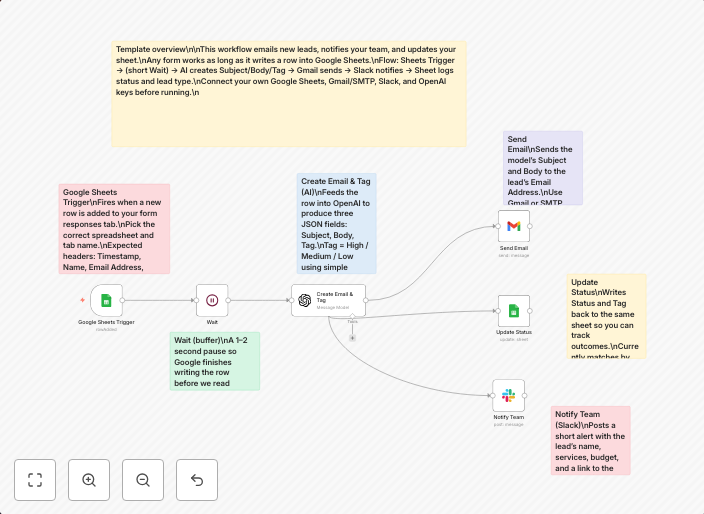
Automate lead response with Google Sheets, OpenAI, Gmail, and Slack notifications
Screenshot 20250926 at 140039 ▶️ Lead Nurturing Agent Generate and send personalized lead emails from Google Sheets via OpenAI to Gmail with Slack...
Get This WorkflowAbout This Workflow
What This Workflow Does
This workflow automates lead response by generating and sending personalized emails to leads from Google Sheets, utilizing OpenAI for content creation, and sending notifications to Gmail and Slack. The goal is to improve lead nurturing and response rates. The workflow streamlines the process, saving time and effort.
Who Should Use This
This workflow is ideal for marketing and sales teams, as well as business owners who want to optimize their lead nurturing process and improve customer engagement.
Key Features
- Personalized Lead Emails: Generate custom email content using OpenAI based on information from Google Sheets.
- Automated Gmail Integration: Send generated emails to leads directly from Gmail.
- Slack Notifications: Receive notifications in Slack when emails are sent or when leads respond.
- Centralized Lead Management: Manage leads in a single Google Sheet, making it easier to track and respond to leads.
How to Get Started
Import this workflow into n8n and customize it to fit your Google Sheets, OpenAI, Gmail, and Slack setup to automate your lead response process. Make sure to update the workflow's settings to match your specific use case and requirements.
Use This Workflow in n8n →Similar Workflows




Affiliate Disclosure: We may earn a commission if you sign up for n8n through our links. This doesn't affect our recommendations.