Automate LinkedIn comment replies with GPT-3.5 & track in Google Sheets
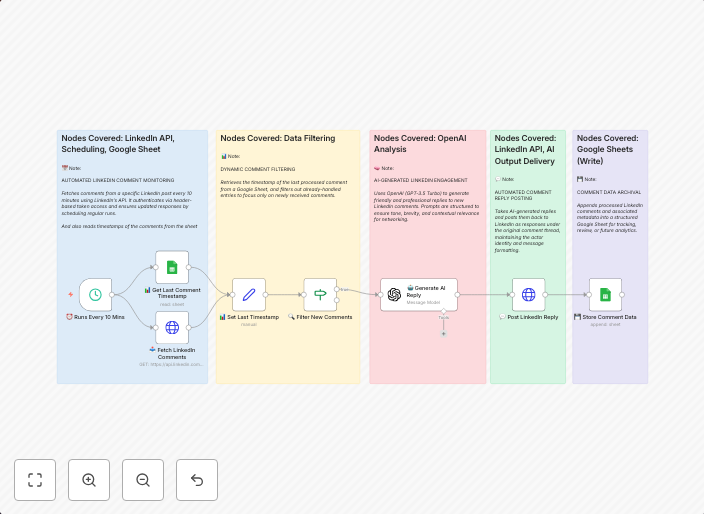
How it worksThis workflow automates LinkedIn community engagement by monitoring post comments, filtering new ones, generating AI-powered replies, and...
Get This WorkflowAbout This Workflow
What This Workflow Does
This workflow enables automated LinkedIn community engagement by monitoring post comments, filtering new ones, generating AI-powered replies, and tracking interactions in a Google Sheets spreadsheet. It streamlines the process of responding to comments on LinkedIn posts, saving time and effort. By leveraging GPT-3.5 technology, the workflow provides personalized and context-aware responses.
Who Should Use This
Developers, marketers, and business owners who want to scale their LinkedIn engagement efforts and automate time-consuming tasks related to community interaction will find this workflow valuable.
Key Features
- Real-time comment monitoring: Tracks new comments on LinkedIn posts and triggers the automation process.
- AI-powered reply generation: Utilizes GPT-3.5 to create personalized and context-aware responses to comments.
- Google Sheets integration: Logs interactions and responses in a Google Sheets spreadsheet for tracking and analysis.
- Flexible configuration: Allows for customization of the workflow to fit individual needs and preferences.
How to Get Started
To use this workflow, import it into n8n, set up the necessary integrations with LinkedIn and Google Sheets, and customize the workflow to fit your specific requirements. Adjust the configuration to match your desired automation settings and start streamlining your LinkedIn community engagement efforts.
Use This Workflow in n8n →Similar Workflows




Affiliate Disclosure: We may earn a commission if you sign up for n8n through our links. This doesn't affect our recommendations.