Automate LLM testing with GPT-4 judge & Google Sheets tracking
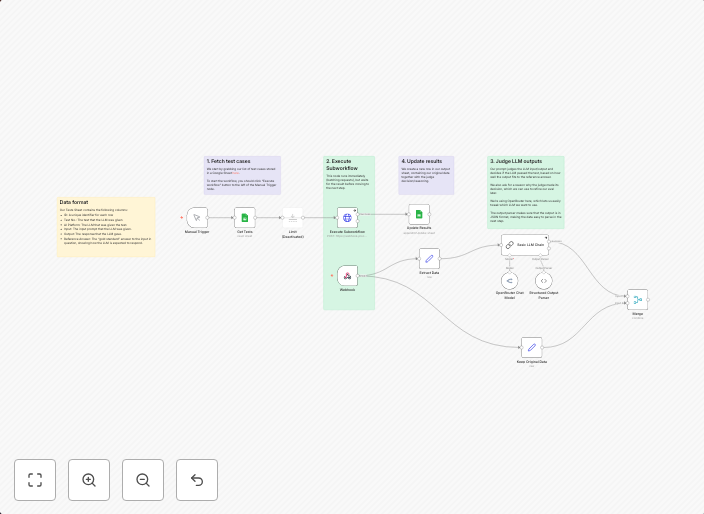
How it worksThe workflow loads a list of test cases from a Google Sheet (previous results stored from an LLM)For each test case, we execute a call to an LLM...
Get This WorkflowAbout This Workflow
What This Workflow Does
This workflow automates the testing of Large Language Models (LLMs) using GPT-4 as a judge and tracks the results in a Google Sheet. It loads pre-existing test cases from a Google Sheet and executes a call to the LLM for each test case, allowing for efficient and organized testing. The results are then stored in the Google Sheet for easy record-keeping.
Who Should Use This
This workflow is designed for developers and engineers who work with Large Language Models and want to streamline their testing and tracking processes. It's particularly useful for those who need to regularly test and compare the performance of different LLMs.
Key Features
- Loads test cases from a Google Sheet for efficient testing
- Executes calls to an LLM for each test case using GPT-4 as a judge
- Tracks results in a Google Sheet for easy record-keeping and comparison
- Automates the testing process, saving time and effort
How to Get Started
To use this workflow, simply import it into your n8n account and configure the Google Sheet and LLM integrations to match your specific setup. You can then customize the workflow to fit your testing needs and start automating your LLM testing process.
Use This Workflow in n8n →Similar Workflows




Affiliate Disclosure: We may earn a commission if you sign up for n8n through our links. This doesn't affect our recommendations.