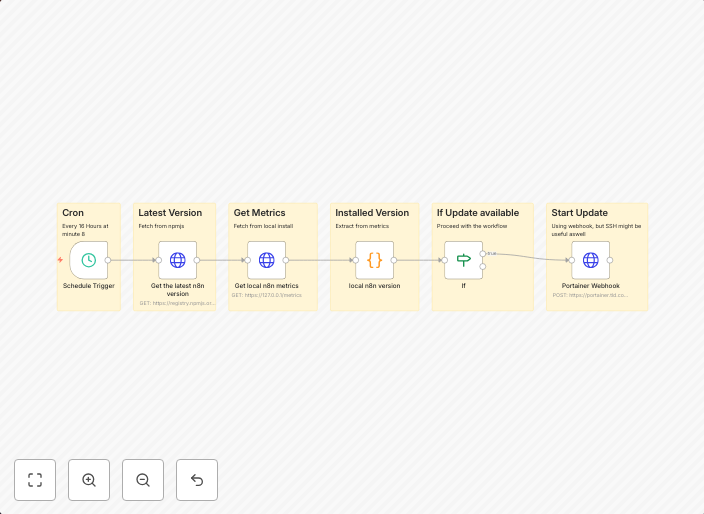
Automate n8n updates with version checking and Portainer webhook
🔄 Purpose of the Workflow:The Update-N8N workflow is designed to automatically trigger a (Portainer) webhook to update an N8N container, but only if a new...
Get This WorkflowAbout This Workflow
What This Workflow Does
The Update-N8N workflow automates the process of updating an N8N container by checking for new versions and triggering a Portainer webhook to perform the update. This ensures that your N8N instance is always running with the latest updates and security patches. The workflow saves time and effort by eliminating manual updates.
Who Should Use This
This workflow is suitable for developers, DevOps teams, and system administrators who manage N8N containers in a production environment. It helps to streamline update processes and reduce the risk of manual errors.
Key Features
- Automated version checking: The workflow continuously checks for new versions of N8N, ensuring that your instance is always up-to-date.
- Portainer webhook integration: The workflow triggers a Portainer webhook to update the N8N container, making it easy to integrate with your existing infrastructure.
- Scheduled updates: The workflow can be configured to run at regular intervals, allowing for seamless updates without downtime.
- Customizable: The workflow can be easily customized to fit your specific needs and update schedules.
Similar Workflows




Affiliate Disclosure: We may earn a commission if you sign up for n8n through our links. This doesn't affect our recommendations.