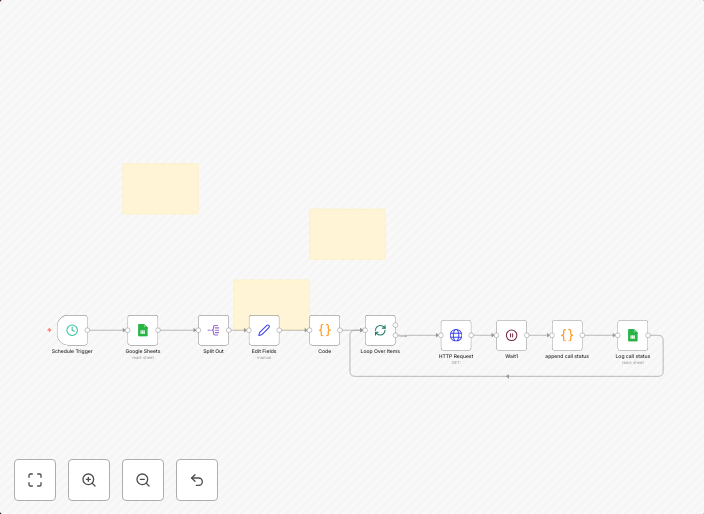
Automate outbound sales calls to qualified leads with VAPI.ai and Google Sheets
This workflow automates outbound calls to qualified leads using VAPI.ai and Google Sheets. Here's how it works and how to set it up. How It Works Read...
Get This WorkflowAbout This Workflow
What This Workflow Does
This workflow automates the process of making outbound sales calls to qualified leads, streamlining your sales follow-up process and ensuring timely communication with potential customers. By integrating with VAPI.ai and Google Sheets, it enables efficient lead nurturing and data management. The workflow reduces manual effort and increases the chances of converting leads into sales.
Who Should Use This
This workflow is ideal for sales teams, business owners, and marketers who want to automate and optimize their lead follow-up process, improve sales productivity, and enhance customer engagement.
Key Features
- Automated Outbound Calls: The workflow uses VAPI.ai to make outbound calls to qualified leads at the right time.
- Real-time Data Updates: Google Sheets integration ensures that lead data is updated in real-time, allowing for seamless tracking and analysis.
- Scalable Lead Nurturing: The workflow enables efficient lead nurturing by automating follow-up calls, reducing manual effort and increasing response rates.
- Centralized Lead Management: Google Sheets provides a centralized platform for managing lead data, making it easier to analyze and optimize sales performance.
How to Get Started
To get started with this workflow, import it into your n8n environment and customize it to fit your business needs. Configure the workflow by connecting your VAPI.ai and Google Sheets accounts, and set up the workflow to trigger automated outbound calls to qualified leads.
Use This Workflow in n8n →Similar Workflows




Affiliate Disclosure: We may earn a commission if you sign up for n8n through our links. This doesn't affect our recommendations.