Automate sales outreach with OpenAI, Tavily & Google Sheets for prospect research
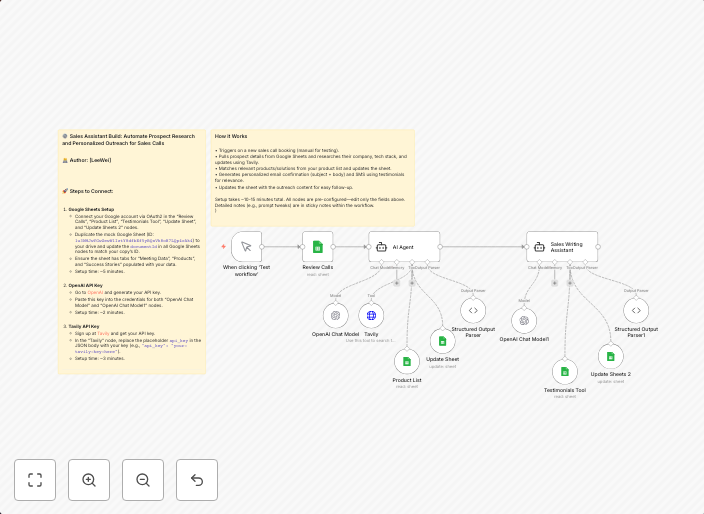
⚙️ Sales Assistant Build: Automate Prospect Research and Personalized Outreach for Sales Calls 🚀 Steps to Connect: Google Sheets Setup Connect your Google...
Get This WorkflowAbout This Workflow
What This Workflow Does
This workflow automates prospect research and personalized sales outreach using OpenAI, Tavily, and Google Sheets. It helps sales teams streamline their research process, generate personalized messages, and follow up with leads in a more efficient manner. By automating repetitive tasks, this workflow saves time and increases the productivity of sales teams.
Who Should Use This
This workflow is ideal for sales teams, sales development representatives (SDRs), and business owners looking to optimize their sales outreach processes. It's also suitable for developers, marketers, and entrepreneurs who want to leverage automation to enhance their lead nurturing strategies.
Key Features
- Prospect research automation: Connects with OpenAI to gather relevant information about prospects, saving time and effort for sales teams.
- Personalized sales outreach: Uses Tavily to generate customized messages and follow-up emails based on prospect research data.
- Google Sheets integration: Stores prospect data and outreach results in a centralized Google Sheets spreadsheet for easy tracking and analysis.
- Efficient follow-up: Automates follow-up emails and calls based on prospect engagement, ensuring timely and consistent follow-up.
How to Get Started
To use this workflow, simply import it into your n8n account and customize the settings to match your sales outreach process. You may need to connect your Google Sheets account, set up Tavily integration, and configure OpenAI credentials to get started.
Use This Workflow in n8n →Similar Workflows




Affiliate Disclosure: We may earn a commission if you sign up for n8n through our links. This doesn't affect our recommendations.