Automate sales pipeline with HubSpot CRM, ScrapeGraphAI & Google Sheets dashboard
Sales Pipeline Automation Dashboard with AI Lead Intelligence 🎯 Target AudienceSales managers and team leadsBusiness development representativesMarketing...
Get This WorkflowAbout This Workflow
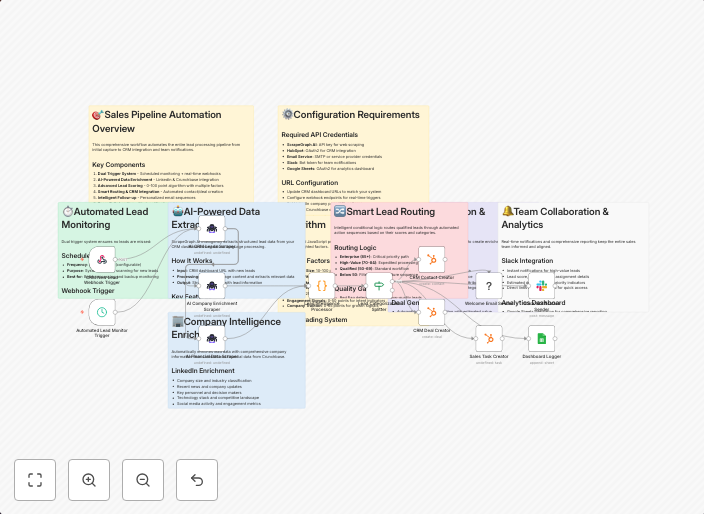
What This Workflow Does
This workflow automates the sales pipeline process by integrating HubSpot CRM, ScrapeGraphAI, and Google Sheets to provide AI-driven lead intelligence and a centralized dashboard. It streamlines sales data collection, analysis, and visualization, enabling sales teams to make data-driven decisions. The automation aims to increase sales efficiency and productivity.
Who Should Use This
Sales managers and team leads can benefit from this workflow to gain actionable insights into their sales pipeline, while business development representatives and marketing teams can leverage the AI-driven lead intelligence to optimize their outreach efforts.
Key Features
- Automates data collection from HubSpot CRM and ScrapeGraphAI to provide a comprehensive view of the sales pipeline.
- Utilizes AI lead intelligence to summarize and analyze sales data, identifying key trends and opportunities.
- Integrates with Google Sheets to create a centralized dashboard for real-time data visualization and reporting.
- Enables sales teams to track pipeline performance, identify bottlenecks, and make data-driven decisions to drive growth.
How to Get Started
To use this workflow, import it into your n8n environment and customize the workflow to suit your specific sales pipeline and data requirements. Adjust the HubSpot CRM and ScrapeGraphAI connections to match your account credentials and configure the Google Sheets integration to reflect your desired dashboard layout.
Use This Workflow in n8n →Similar Workflows




Affiliate Disclosure: We may earn a commission if you sign up for n8n through our links. This doesn't affect our recommendations.