Automate security alert triage with NixGuard AI and route to Slack or Jira
Are you drowning in a sea of security notifications? Do your analysts spend more time sifting through low-level logs than investigating real threats? This...
Get This WorkflowAbout This Workflow
What This Workflow Does
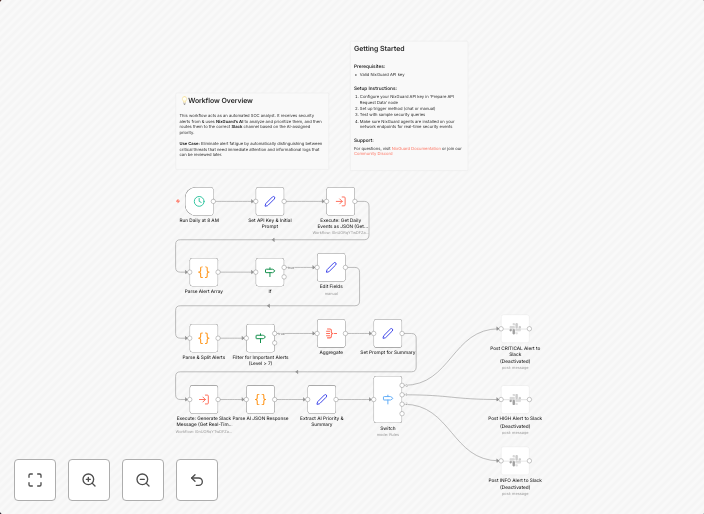
This workflow automates the triage of security alerts using NixGuard AI, allowing analysts to focus on real threats rather than low-level logs. It summarizes security notifications and routes them to either Slack or Jira for further investigation. By automating this process, organizations can reduce noise in their security operations and improve incident response times.
Who Should Use This
This workflow is ideal for security operations teams, incident response teams, and security analysts who want to streamline their security alert management and improve the efficiency of their threat investigation processes.
Key Features
- AI-powered alert summarization: NixGuard AI summarizes security notifications to reduce noise and focus on high-priority incidents.
- Customizable routing: Route security alerts to Slack or Jira for further investigation and collaboration.
- Automated workflow: No manual intervention required, saving time and reducing analyst fatigue.
- Flexibility: Easily customize the workflow to fit your organization's specific security operations requirements.
How to Get Started
To get started, import this workflow into your n8n instance and customize the settings to fit your organization's security operations needs. Configure the workflow to integrate with your preferred notification channels and AI-powered security solutions.
Use This Workflow in n8n →Similar Workflows




Affiliate Disclosure: We may earn a commission if you sign up for n8n through our links. This doesn't affect our recommendations.