Automate stale deal follow-ups in Salesforce with GPT-5.1, email, Slack & tasks
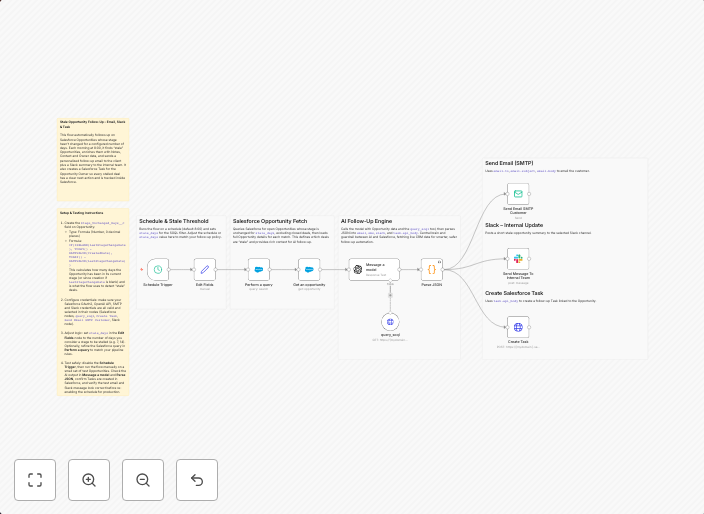
How it worksRuns every morning at 8:00 using the Schedule Trigger. Sets a stale_days value and queries Salesforce for Opportunities where...
Get This WorkflowAbout This Workflow
What This Workflow Does
This n8n automation workflow is designed to automate stale deal follow-ups in Salesforce by integrating GPT-5.1 for AI-powered summarization, email sending, Slack notifications, and task creation. Every morning at 8:00, it identifies opportunities in Salesforce that have not been updated within a specified stale_days value.
Who Should Use This
This workflow is suitable for Salesforce users who want to streamline their lead nurturing process, particularly sales teams, marketing automation specialists, and business owners looking to optimize their sales pipeline.
Key Features
- Identifies Stale Deals: The workflow queries Salesforce for opportunities that have not been updated within a specified stale_days value.
- AI-Powered Summarization: GPT-5.1 is used to summarize the stale opportunities, providing a concise overview of the deals.
- Automated Follow-up: Emails are sent to the relevant stakeholders with the summarized information.
- Task Creation: Tasks are created in Salesforce to follow up with the stale opportunities.
- Slack Notifications: Slack notifications are sent to the team to ensure everyone is informed about the stale deals.
How to Get Started
To use this workflow, import it into your n8n environment and customize the stale_days value to suit your sales pipeline requirements. You may also need to set up the GPT-5.1, email, Slack, and Salesforce integrations in your n8n workflow.
Use This Workflow in n8n →Similar Workflows




Affiliate Disclosure: We may earn a commission if you sign up for n8n through our links. This doesn't affect our recommendations.