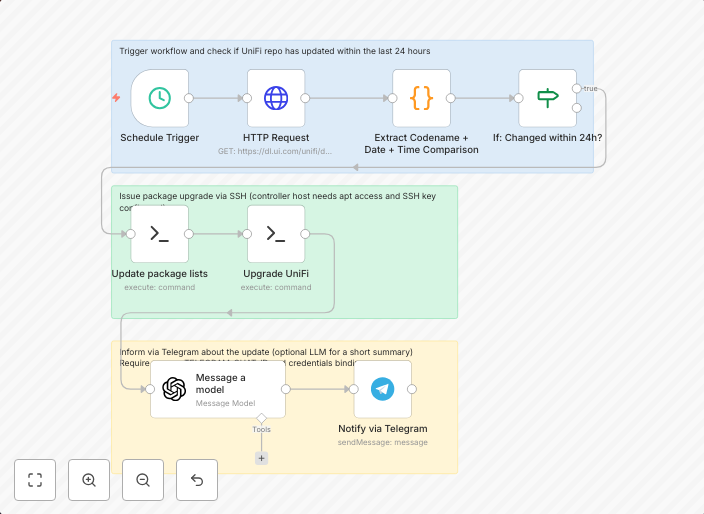
Automate UniFi controller updates via SSH with Telegram notifications
OverviewAutomate UniFi Controller updates on self-hosted instances. This workflow checks the official UniFi Debian repo for a fresh release in the last 24...
Get This WorkflowAbout This Workflow
What This Workflow Does
This workflow automates the process of updating a self-hosted UniFi controller instance via SSH, providing a convenient way to keep the software up-to-date. It checks the official UniFi Debian repository for new releases every 24 hours and notifies the user via Telegram when an update is available. This ensures that the UniFi controller is always running the latest version with the latest features and security patches.
Who Should Use This
This workflow is ideal for network administrators and DevOps professionals responsible for managing self-hosted UniFi controller instances. It can also be useful for anyone who wants to automate routine maintenance tasks and receive timely notifications about software updates.
Key Features
- Automates UniFi controller updates via SSH to ensure the latest version is always installed.
- Checks the official UniFi Debian repository for new releases every 24 hours.
- Sends Telegram notifications when an update is available, keeping users informed and up-to-date.
- Can be easily customized to fit individual needs and workflows.
How to Get Started
To use this workflow, simply import it into your n8n instance and customize the Telegram notification settings to match your preferences. From there, you can set the workflow to run automatically every 24 hours to ensure your UniFi controller is always up-to-date.
Use This Workflow in n8n →Similar Workflows




Affiliate Disclosure: We may earn a commission if you sign up for n8n through our links. This doesn't affect our recommendations.