Automated export of Quickbooks Online data with n8n - with tutorial
Video IntroductionVideo Walkthrough Want to automate your inbox or need a custom workflow? 📞 Book a Call | 💬 DM me on Linkedin Overview This workflow...
Get This WorkflowAbout This Workflow
What This Workflow Does
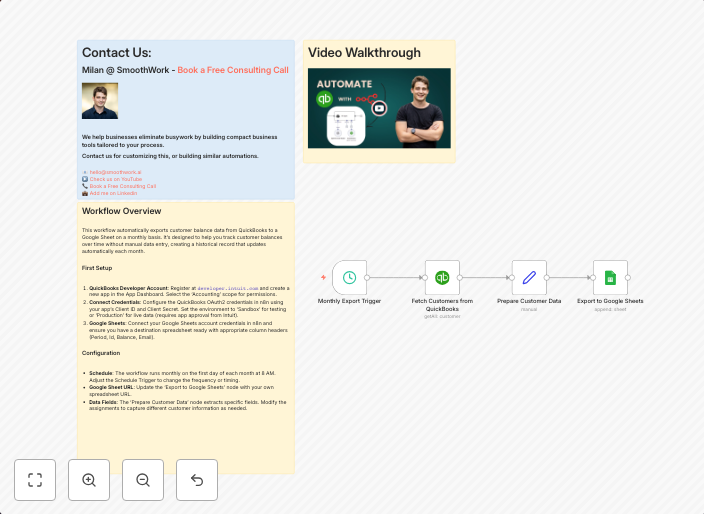
This workflow automates the export of data from Quickbooks Online, allowing users to easily retrieve and utilize their accounting data in other applications. By integrating with Quickbooks Online, this workflow streamlines the process of exporting financial information, making it accessible for further analysis, reporting, or integration with other systems. The automation can be customized to export specific types of data.
Who Should Use This
This workflow is ideal for business owners, accountants, and developers who need to extract and utilize financial data from Quickbooks Online for various purposes, such as data analysis, reporting, or integrating with other business applications.
Key Features
- Automated data export: The workflow exports data from Quickbooks Online at regular intervals, ensuring users have the most up-to-date financial information.
- Customizable export: Users can specify the types of data to export, such as invoices, customers, or financial statements.
- Integration with other apps: The exported data can be easily integrated with other business applications, such as CRM systems or data analysis tools.
How to Get Started
To use this workflow, import it into your n8n account and customize the settings to match your specific data export needs. You can then schedule the workflow to run at regular intervals, ensuring a continuous flow of up-to-date financial data.
Use This Workflow in n8n →Similar Workflows




Affiliate Disclosure: We may earn a commission if you sign up for n8n through our links. This doesn't affect our recommendations.