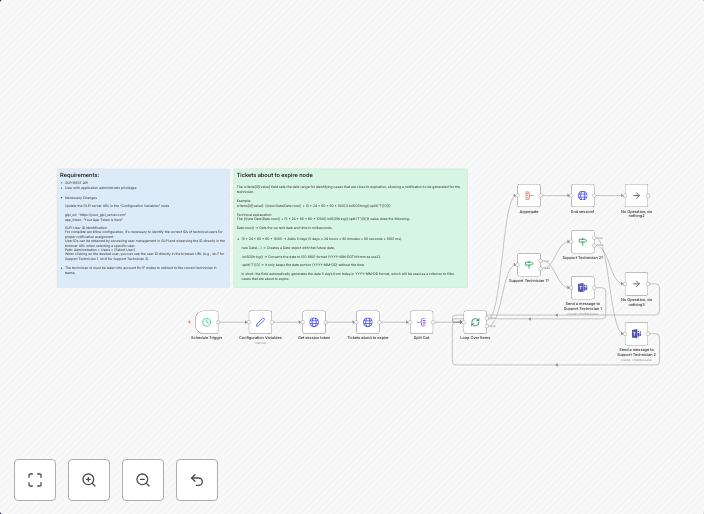
Automated GLPI ticket deadline alerts via Microsoft Teams
Overview This n8n workflow provides an automated notification system that monitors tickets in GLPI (Gestionnaire Libre de Parc Informatique) and sends...
Get This WorkflowAbout This Workflow
What This Workflow Does
This n8n workflow automates the process of sending deadline alerts for tickets in GLPI (Gestionnaire Libre de Parc Informatique) via Microsoft Teams. It continuously monitors tickets and notifies relevant teams when deadlines are approaching, ensuring timely responses and efficient ticket management. The workflow reduces the risk of missed deadlines and improves collaboration within teams.
Who Should Use This
This workflow is ideal for IT administrators, help desk teams, and system integrators who manage tickets in GLPI and want to improve their communication and collaboration with teams. It's also suitable for organizations looking to automate their ticket management processes and enhance their incident response efficiency.
Key Features
- Monitors GLPI tickets for approaching deadlines
- Sends automated notifications to Microsoft Teams when deadlines are near
- Continuously checks for new tickets and updates deadlines
- Integrates GLPI and Microsoft Teams without manual intervention
How to Get Started
To use this workflow, simply import it into your n8n account and customize the Microsoft Teams and GLPI connections to match your environment. You can then adjust the workflow settings to suit your specific notification requirements and ensure seamless communication between teams.
Use This Workflow in n8n →Similar Workflows




Affiliate Disclosure: We may earn a commission if you sign up for n8n through our links. This doesn't affect our recommendations.