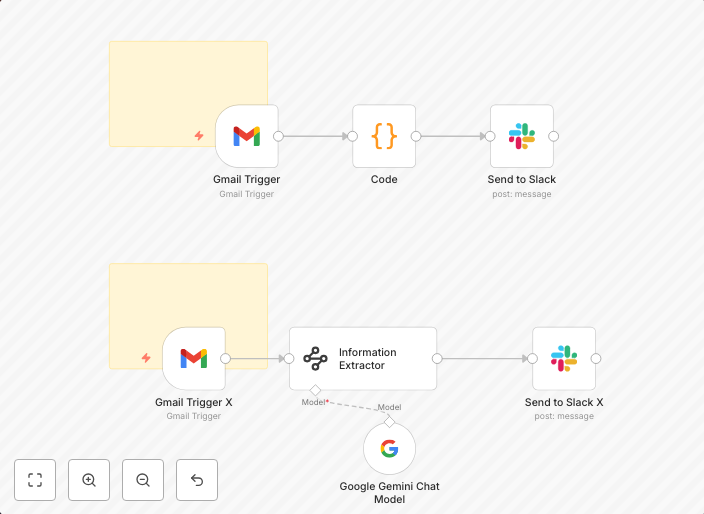
Automated Upwork messages alerts to Slack with Gmail and Google Gemini AI
Upwork Messages Notifications (Gmail to Slack) - Fully Automated Alerts This n8n workflow streamlines how you receive Upwork client messages, sending...
Get This WorkflowAbout This Workflow
What This Workflow Does
This workflow automates the process of receiving Upwork client messages by sending notifications to Slack using Gmail and Google Gemini AI for AI-powered summarization. It streamlines the way you stay on top of client communication, ensuring you never miss an important message. The workflow is fully automated, saving you time and effort.
Who Should Use This
This workflow is ideal for freelancers, businesses, and entrepreneurs who use Upwork for client communication and want to stay organized and focused on their work.
Key Features
- Sends Upwork client messages to Slack for real-time notification
- Uses Gmail as a trigger to monitor new Upwork messages
- Utilizes Google Gemini AI for AI-powered summarization of long messages
- Enhances productivity by automating client communication alerts
How to Get Started
To get started, import this workflow into n8n and customize it according to your Upwork and Slack account settings. You can adjust the workflow to fit your specific needs and preferences.
Use This Workflow in n8n →Similar Workflows




Affiliate Disclosure: We may earn a commission if you sign up for n8n through our links. This doesn't affect our recommendations.