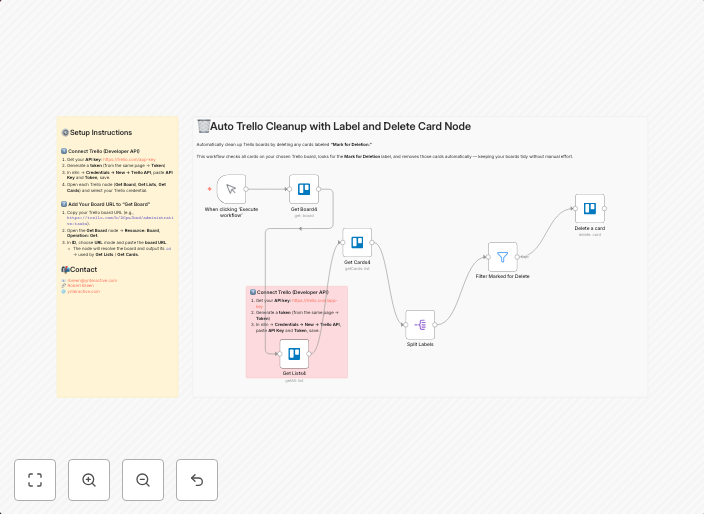
Automatic Trello board cleanup by removing cards with specific labels
Automatically clean up Trello boards by deleting any cards labeled “Mark for Deletion.” This workflow checks all cards on your chosen Trello board, looks...
Get This WorkflowAbout This Workflow
What This Workflow Does
This workflow is designed to automatically clean up Trello boards by deleting cards labeled "Mark for Deletion." It checks all cards on a chosen Trello board and removes those with the specified label, streamlining your board organization and saving you time.
Who Should Use This
This workflow is ideal for project managers, team leaders, and anyone responsible for maintaining organized Trello boards. It's also suitable for businesses using Trello for task management, as it helps keep boards clutter-free and up-to-date.
Key Features
- Automatically searches for cards labeled "Mark for Deletion" on a specified Trello board
- Allows you to choose which Trello board to clean up
- Enables the deletion of marked cards
- Works in real-time, keeping your board organized at all times
How to Get Started
To use this workflow, simply import it into your n8n account and customize it to point to your desired Trello board. From there, you can run the workflow to automatically clean up your board by deleting cards with the "Mark for Deletion" label.
Use This Workflow in n8n →Similar Workflows




Affiliate Disclosure: We may earn a commission if you sign up for n8n through our links. This doesn't affect our recommendations.