Automatically create Linear issues from Gmail support request messages
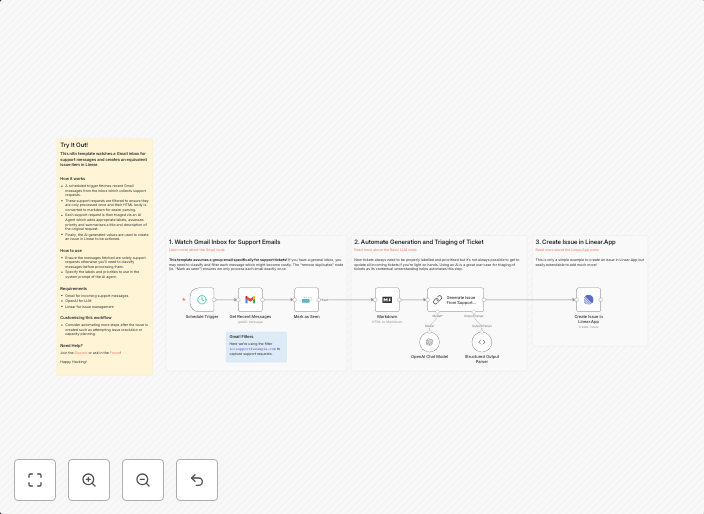
This n8n template watches a Gmail inbox for support messages and creates an equivalent issue item in Linear. How it worksA scheduled trigger fetches recent...
Get This WorkflowAbout This Workflow
What This Workflow Does
This n8n template automates the creation of Linear issues from support request messages in a Gmail inbox, streamlining ticket management and saving time for support teams. By syncing support emails with Linear issues, users can efficiently manage customer inquiries and resolve issues faster. The workflow helps maintain a centralized issue tracker, reducing email clutter and improving team collaboration.
Who Should Use This
This workflow is ideal for support teams, product managers, and business owners who rely on email for support requests and want to integrate their ticket management with Linear. It's perfect for those looking to automate manual tasks, reduce email overhead, and improve customer issue resolution.
Key Features
- Gmail inbox monitoring: The workflow continuously scans the designated Gmail inbox for new support messages.
- Linear issue creation: New support messages are automatically converted into Linear issues, including relevant details.
- Scheduled trigger: The workflow runs on a scheduled basis, allowing users to fetch recent support messages and create corresponding Linear issues.
- Integration with Linear: The workflow leverages the Linear API to create and manage issues directly within the Linear platform.
How to Get Started
To use this workflow, simply import it into your n8n account and configure the Gmail and Linear integrations according to your setup. Customize the workflow settings to match your support email address and Linear project requirements, and you're ready to automate your ticket management process.
Use This Workflow in n8n →Similar Workflows




Affiliate Disclosure: We may earn a commission if you sign up for n8n through our links. This doesn't affect our recommendations.