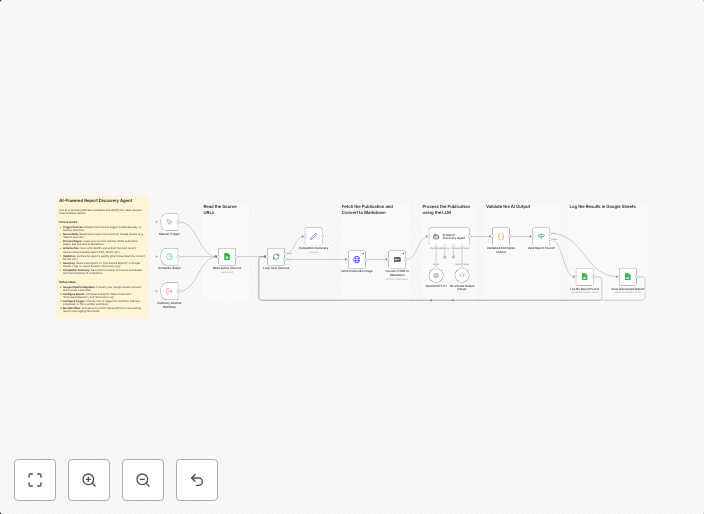
Automatically discover and extract reports from websites using GPT and Google Sheets
An intelligent AI-powered agent that automatically browses publication websites, analyzes page content with natural language understanding, and identifies...
Get This WorkflowAbout This Workflow
What This Workflow Does
This workflow uses GPT (Generative Pre-trained Transformer) to automatically discover and extract reports from websites, making it an efficient tool for market research and analysis. It leverages natural language understanding to analyze page content, allowing for the identification of relevant information. The extracted data is then stored in a Google Sheets document for further analysis and visualization.
Who Should Use This
This workflow is ideal for market researchers, business owners, and analysts who need to efficiently collect and analyze data from various websites without manual intervention. It saves time and effort by automating the process of report discovery and data extraction.
Key Features
- Automated Report Discovery: The workflow uses GPT to browse publication websites and find relevant reports, saving time and effort.
- Natural Language Understanding: GPT analyzes page content using natural language understanding, allowing for accurate identification of relevant information.
- Data Extraction and Storage: The workflow extracts relevant data from reports and stores it in a Google Sheets document for further analysis and visualization.
How to Get Started
To use this workflow, import it into your n8n instance and customize the settings to match your specific requirements, such as website URLs and GPT credentials. From there, you can set up a schedule or trigger to run the workflow automatically, allowing you to collect and analyze data on a regular basis.
Use This Workflow in n8n →Similar Workflows




Affiliate Disclosure: We may earn a commission if you sign up for n8n through our links. This doesn't affect our recommendations.