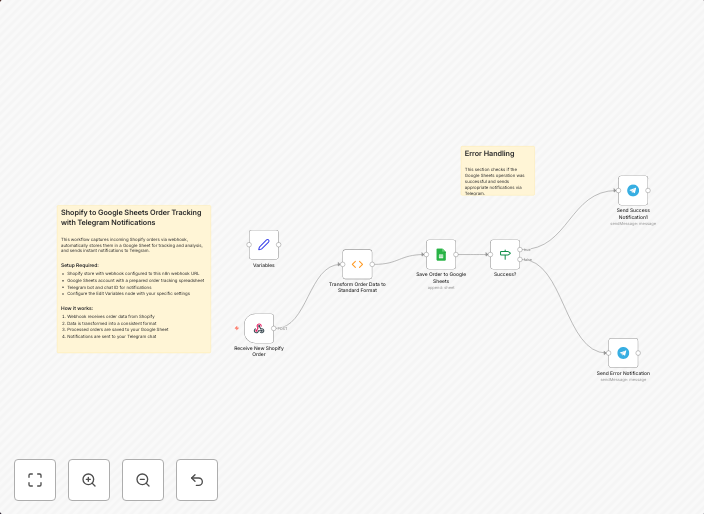
Automatically store Shopify orders in Google Sheets with Telegram notifications
This workflow is designed for e-commerce store owners, operations managers, and developers who use Shopify as their e-commerce platform and want an...
Get This WorkflowAbout This Workflow
What This Workflow Does
This workflow automates the process of storing Shopify orders in Google Sheets and sends Telegram notifications for each new order. It eliminates the need for manual data entry, ensuring timely and accurate order tracking. By integrating Shopify, Google Sheets, and Telegram, this workflow improves operational efficiency and enables seamless communication.
Who Should Use This
This workflow is ideal for e-commerce store owners, operations managers, and developers who use Shopify as their e-commerce platform and want to streamline order management and communication with customers or team members.
Key Features
- Automated Order Tracking: Shopify orders are automatically stored in Google Sheets, eliminating manual data entry and ensuring accurate order tracking.
- Real-time Notifications: Telegram notifications are sent for each new order, keeping customers and team members informed about order status.
- Effortless Integration: The workflow seamlessly integrates Shopify, Google Sheets, and Telegram, requiring minimal setup and configuration.
- Customizable: The workflow can be easily customized to fit individual needs and preferences.
How to Get Started
To use this workflow, simply import it into your n8n account and customize the settings to match your Shopify and Google Sheets credentials. Then, configure the Telegram integration to send notifications to the desired recipients, and start automating your order tracking and notification process.
Use This Workflow in n8n →Similar Workflows




Affiliate Disclosure: We may earn a commission if you sign up for n8n through our links. This doesn't affect our recommendations.