Batch verify emails in Google Sheet with Icypeas
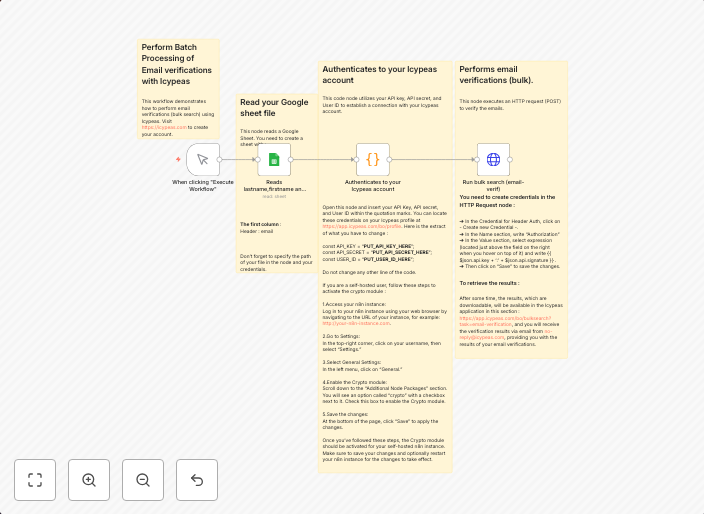
This template can be used to verify email addresses with Icypeas. Be sure to have an active account to use this template. How it worksThis workflow can be...
Get This WorkflowAbout This Workflow
What This Workflow Does
This workflow automates the process of verifying email addresses using Icypeas, allowing you to efficiently validate email lists in a Google Sheet. It streamlines the process of checking email validity, saving you time and effort. By integrating Icypeas with Google Sheets, this workflow provides a seamless email verification experience.
Who Should Use This
This workflow is suitable for developers, marketers, and business owners who require efficient email list validation for lead generation, data cleansing, or email marketing campaigns. If you're looking for an automated solution to verify email addresses, this workflow is a valuable resource.
Key Features
- Email validation with Icypeas: Verify email addresses in real-time using Icypeas, ensuring accurate and up-to-date email lists.
- Google Sheets integration: Sync email lists from Google Sheets, allowing for easy data management and verification.
- Automated email validation: Save time and effort by automating the email verification process, reducing the risk of manual errors.
- Real-time updates: Receive instant updates on email verification results, enabling you to make data-driven decisions quickly.
How to Get Started
To use this workflow, import it into your n8n instance and customize the settings to match your Google Sheets account and Icypeas credentials. This workflow is designed to be easy to use, with a straightforward setup process that requires minimal technical expertise.
Use This Workflow in n8n →Similar Workflows




Affiliate Disclosure: We may earn a commission if you sign up for n8n through our links. This doesn't affect our recommendations.