✍️ Blog image SEO & size auditor with Ghost and Google Sheets
*Tags: Ghost CMS, SEO Audit, Image Optimisation, Alt Text, Google Sheets, Automation* Context Hi! I’m Samir — a Supply Chain Engineer and Data Scientist...
Get This WorkflowAbout This Workflow
What This Workflow Does
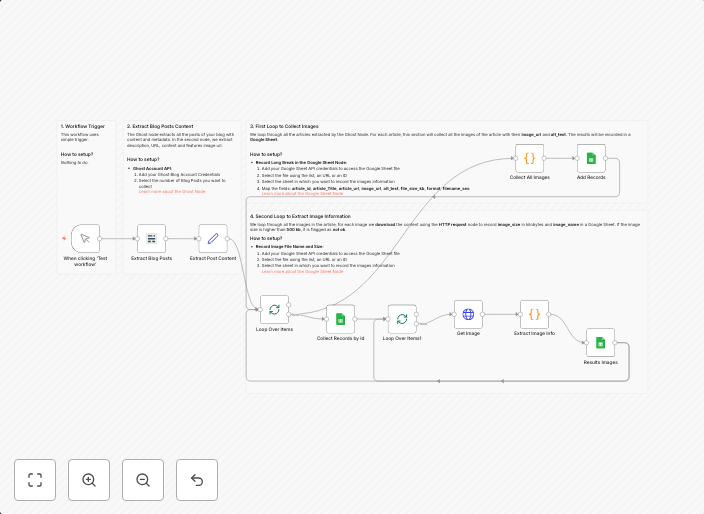
This n8n automation workflow audits blog images for SEO and size optimization using Ghost CMS and Google Sheets. It helps ensure that images on your blog have proper alt text, sizes, and other SEO-related properties. The workflow makes it easier to maintain a well-optimized image library for your blog.
Who Should Use This
This workflow is suitable for developers, marketers, and business owners who manage blogs using Ghost CMS and want to improve their image SEO and size optimization. It's particularly helpful for those who frequently upload new images to their blog and want to automate the process of checking and optimizing their image properties.
Key Features
- Image SEO Audit: The workflow checks image alt text, titles, descriptions, and other SEO-related properties to ensure they are properly set up.
- Image Size Optimization: It optimizes image sizes to reduce file weight, improving page load times and search engine rankings.
- Google Sheets Integration: The workflow updates a Google Sheet with image metadata, making it easier to track and analyze image performance.
- Ghost CMS Integration: The workflow integrates seamlessly with Ghost CMS, allowing you to automate image optimization and SEO checks directly from your blog platform.
How to Get Started
To get started with this workflow, import it into your n8n account and customize the workflow by setting up the necessary triggers, such as a schedule or a webhook from Ghost CMS. You can also modify the Google Sheets integration to suit your specific needs and track image performance in a way that works best for you.
Use This Workflow in n8n →Similar Workflows




Affiliate Disclosure: We may earn a commission if you sign up for n8n through our links. This doesn't affect our recommendations.