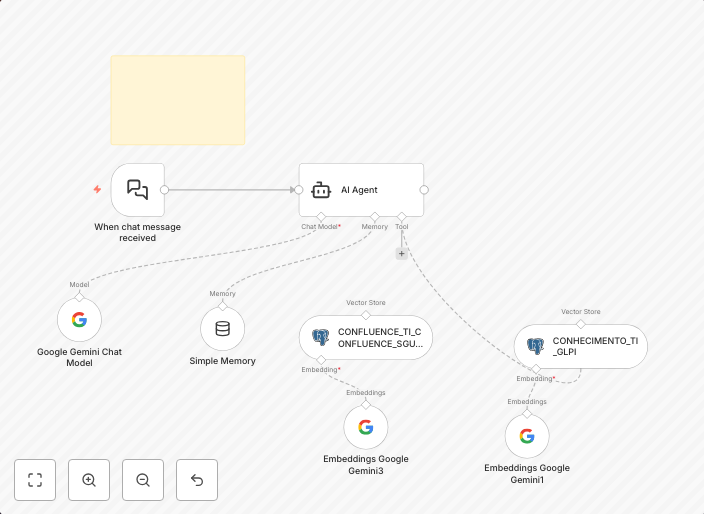
Build a GLPI knowledge base RAG pipeline with Google Gemini and PostgreSQL
DescriptionThis workflow automates the creation of a Retrieval-Augmented Generation (RAG) pipeline using content from the GLPI Knowledge Base. It retrieves...
Get This WorkflowAbout This Workflow
What This Workflow Does
This workflow automates the creation of a Retrieval-Augmented Generation (RAG) pipeline using content from the GLPI Knowledge Base, integrating with Google Gemini and PostgreSQL. It retrieves relevant information and generates a comprehensive knowledge base that can be used for various applications. By automating this process, users can save time and effort, and have access to a centralized and up-to-date knowledge base.
Who Should Use This
This workflow is ideal for developers, data analysts, and business owners who need to create a comprehensive knowledge base for their organization. It is particularly useful for those who manage complex information systems, such as those using GLPI, and want to leverage the power of multimodal AI.
Key Features
- Retrieves content from the GLPI Knowledge Base using API integration
- Utilizes Google Gemini for multimodal AI processing and generation
- Integrates with PostgreSQL for data storage and management
- Automates the creation of a RAG pipeline for comprehensive knowledge base generation
How to Get Started
To use this workflow, simply import it into your n8n account and customize the settings to fit your specific needs. You may need to adjust the GLPI API credentials, PostgreSQL database connection, and other parameters to ensure seamless integration with your systems.
Use This Workflow in n8n →Similar Workflows




Affiliate Disclosure: We may earn a commission if you sign up for n8n through our links. This doesn't affect our recommendations.