Build a LinkedIn job intelligence pipeline with Apify and Google Sheets
Categories Lead Generation, Market Intelligence, Recruitment Automation, Business Intelligence LinkedIn Job Intelligence Automation (n8n + Apify) This...
Get This WorkflowAbout This Workflow
Build a LinkedIn job intelligence pipeline with Apify and Google Sheets
What This Workflow Does
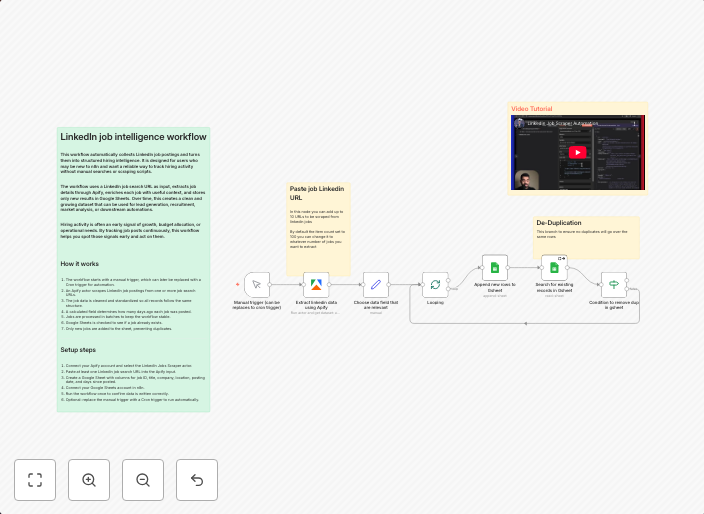
This workflow automates the process of extracting job postings and market intelligence from LinkedIn, and stores the data in a Google Sheets spreadsheet. It utilizes Apify to scrape job postings and n8n to integrate and process the data. The resulting pipeline provides valuable insights for businesses and recruiters to make informed decisions.
Who Should Use This
This workflow is ideal for developers, marketers, and business owners looking to leverage market intelligence and recruitment automation. They can use this pipeline to gain a competitive edge in the job market and make data-driven decisions.
Key Features
- LinkedIn Job Scraping: Uses Apify to scrape job postings from LinkedIn, including job titles, descriptions, and requirements.
- Data Integration with Google Sheets: Stores the scraped data in a Google Sheets spreadsheet, making it easy to analyze and visualize.
- Flexible Configuration: Allows users to customize the workflow to suit their specific needs, including filtering and sorting job postings.
- Scheduled Updates: Automatically updates the Google Sheets spreadsheet with new job postings at regular intervals.
How to Get Started
To start using this workflow, import it into your n8n account and customize the settings to fit your specific needs. Configure the Apify API credentials and Google Sheets spreadsheet settings, and schedule the workflow to run at regular intervals to stay up-to-date with the latest job postings.
Use This Workflow in n8n →Similar Workflows




Affiliate Disclosure: We may earn a commission if you sign up for n8n through our links. This doesn't affect our recommendations.