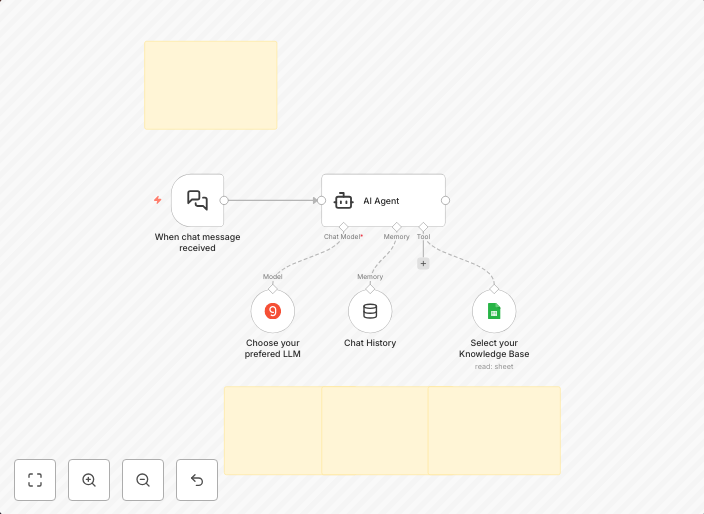
Build a website customer support chatbot with Groq AI and Google Sheets knowledge base
Build a Website Customer Support Chatbot with Groq AI and Google Sheets as its Knowledge Base. Setup Instructions PrerequisitesAPI Credentials Required:...
Get This WorkflowAbout This Workflow
What This Workflow Does
This workflow automates the setup of a website customer support chatbot using Groq AI and Google Sheets as its knowledge base. It integrates these tools to provide a seamless experience for users seeking support on your website. The chatbot can answer common questions and route more complex issues to human support agents.
Who Should Use This
This workflow is ideal for developers, marketers, and business owners who want to improve their website's customer support experience without requiring extensive development expertise. It's perfect for companies with a growing user base and a need for efficient support.
Key Features
- Integrates Groq AI with Google Sheets as its knowledge base for accurate and up-to-date responses.
- Automates the routing of complex issues to human support agents for timely resolution.
- Provides a seamless customer support experience on your website.
- Allows for easy updating of the knowledge base using Google Sheets.
How to Get Started
To use this workflow, simply import it into your n8n account and customize the settings to match your Google Sheets knowledge base and Groq AI credentials. Follow the workflow's instructions to connect your tools and start automating your customer support chatbot.
Use This Workflow in n8n →Similar Workflows




Affiliate Disclosure: We may earn a commission if you sign up for n8n through our links. This doesn't affect our recommendations.