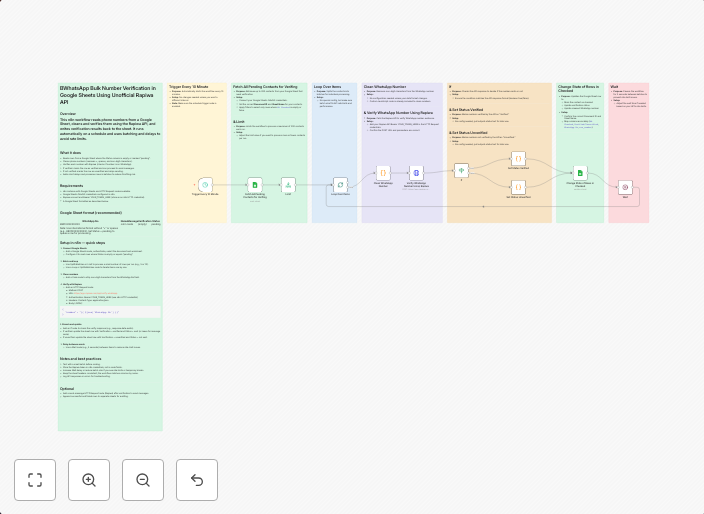
Bulk verify WhatsApp numbers using Rapiwa API and Google Sheets
WhatsApp Bulk Number Verification in Google Sheets Using Unofficial Rapiwa API Who’s it forThis workflow is for marketers, small business owners,...
Get This WorkflowAbout This Workflow
Bulk Verify WhatsApp Numbers Using Rapiwa API and Google Sheets
What This Workflow Does
This n8n automation workflow allows you to verify multiple WhatsApp numbers at once using the unofficial Rapiwa API. It fetches WhatsApp numbers from a Google Sheets spreadsheet, verifies them, and updates the spreadsheet with the result. This saves time and effort, making it easier to manage and validate WhatsApp contacts.
Who Should Use This
This workflow is designed for marketers, small business owners, and any individual looking to streamline their WhatsApp number verification process. It's perfect for those who frequently work with large lists of WhatsApp numbers.
Key Features
- Automated WhatsApp number verification: Quickly verify multiple WhatsApp numbers using the Rapiwa API.
- Integration with Google Sheets: Fetch WhatsApp numbers from a Google Sheets spreadsheet and update the spreadsheet with verification results.
- Effortless management: Save time by automating the verification process, allowing you to focus on more important tasks.
How to Get Started
To start using this workflow, import it into n8n and customize the configuration to match your specific requirements. Connect your Google Sheets account, replace the sample WhatsApp numbers with your own, and adjust the settings to fit your needs.
Use This Workflow in n8n →Similar Workflows




Affiliate Disclosure: We may earn a commission if you sign up for n8n through our links. This doesn't affect our recommendations.