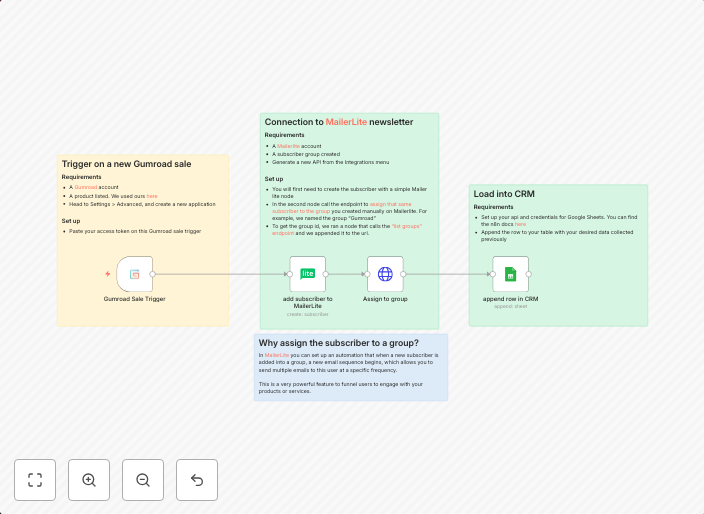
Capture Gumroad sales, add buyer to MailerLite group, log to Google Sheets CRM
Turn Gumroad buyers into loyal email subscribers and keep your CRM up‑to‑date. When someone makes a purchase on your Gumroad store, this n8n workflow...
Get This WorkflowAbout This Workflow
What This Workflow Does
This n8n automation workflow captures sales from Gumroad, adds buyers to a MailerLite group, and logs the purchase information to a Google Sheets CRM. The workflow integrates Gumroad, MailerLite, and Google Sheets to automate the process of turning buyers into loyal email subscribers and keeping your customer relationship management (CRM) up-to-date. By automating this process, you can save time and ensure that all your sales are accurately reflected in your CRM.
Who Should Use This
This workflow is ideal for business owners, marketers, and developers who want to automate the process of turning Gumroad buyers into email subscribers and update their CRM in real-time.
Key Features
- Capture Gumroad sales: The workflow automates the capture of sales from your Gumroad store, allowing you to easily track and analyze your sales data.
- Add buyer to MailerLite group: When a purchase is made, the workflow adds the buyer to a specific MailerLite group, enabling you to send targeted email campaigns to your subscribers.
- Log to Google Sheets CRM: The workflow logs the purchase information to a Google Sheets CRM, ensuring that all sales are accurately reflected in your CRM and easily accessible for analysis and reporting.
How to Get Started
To get started with this workflow, simply import it into your n8n account and customize the integrations to match your Gumroad, MailerLite, and Google Sheets accounts.
Use This Workflow in n8n →Similar Workflows




Affiliate Disclosure: We may earn a commission if you sign up for n8n through our links. This doesn't affect our recommendations.