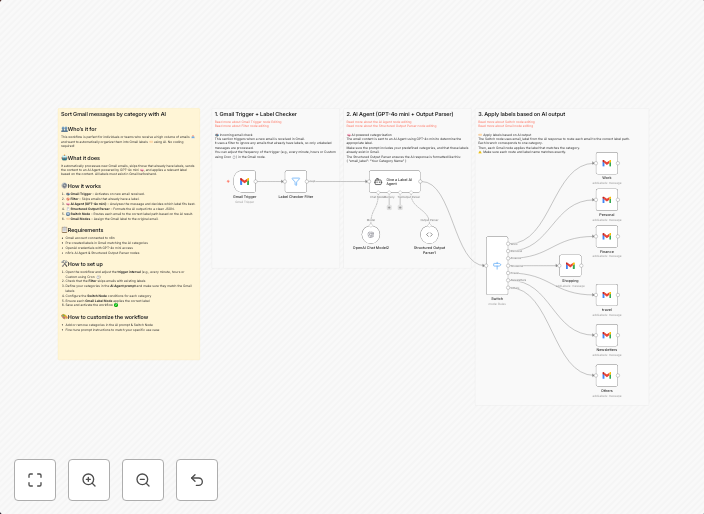
Categorize and label incoming Gmail emails automatically with GPT-4o mini
Sort New Gmail messages by category with AI 👥 Who's it for This workflow is perfect for individuals or teams who receive a high volume of emails 📥 and...
Get This WorkflowAbout This Workflow
What This Workflow Does
This workflow automates the process of categorizing and labeling incoming Gmail emails using GPT-4o mini, helping to streamline email management and reduce the time spent on manually sorting emails. It utilizes AI-powered processing to efficiently sort new Gmail messages by category. This results in a more organized inbox and improved productivity.
Who Should Use This
This workflow is perfect for individuals or teams who receive a high volume of emails and struggle to keep their inboxes organized. It's particularly useful for business owners, marketers, or customer support teams who need to quickly identify and prioritize important emails.
Key Features
- AI-powered email categorization: GPT-4o mini is used to automatically classify incoming emails into relevant categories.
- Automated labeling: Emails are labeled accordingly, making it easier to identify and prioritize important messages.
- Improved email management: The workflow helps to reduce email clutter and increase productivity.
- Integration with Gmail: Seamless integration with Gmail allows for effortless processing of incoming emails.
How to Get Started
To start using this workflow, simply import it into your n8n environment and customize the settings to match your specific email management needs. You can then integrate it with your Gmail account to begin automating the categorization and labeling of your incoming emails.
Use This Workflow in n8n →Similar Workflows




Affiliate Disclosure: We may earn a commission if you sign up for n8n through our links. This doesn't affect our recommendations.