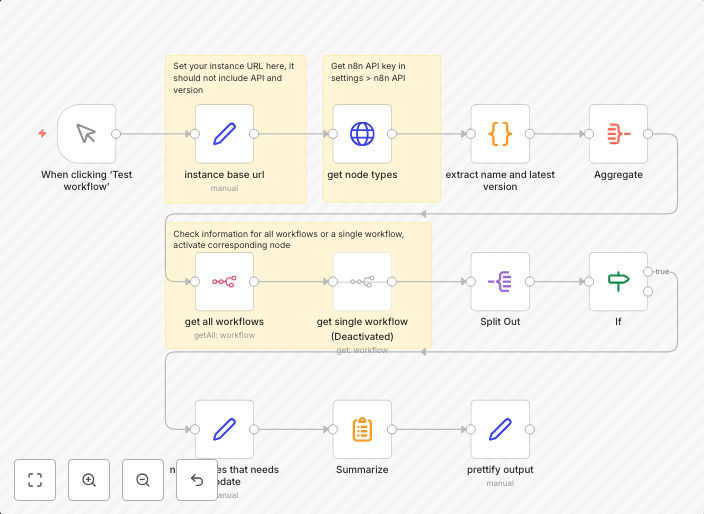
Check if workflows contain build-in nodes that are not of the latest version
How it worksit will return workflows that have buil-in nodes not of latest version with information of node name, type, current version and latest version...
Get This WorkflowAbout This Workflow
What This Workflow Does
This n8n automation workflow checks for workflows that contain built-in nodes that are not of the latest version. It provides detailed information about the nodes, including their name, type, current version, and latest version. This helps users identify and update workflows to ensure they are using the most recent and secure versions of built-in nodes.
Who Should Use This
This workflow is ideal for DevOps teams, developers, and system administrators who need to maintain and update workflows to ensure security and compliance.
Key Features
- Identifies built-in nodes that are not of the latest version
- Provides detailed information about the nodes, including name, type, current version, and latest version
- Helps users prioritize updates to ensure workflows are secure and up-to-date
- Automates the process of checking for outdated nodes, saving time and effort
How to Get Started
To use this workflow, simply import it into your n8n instance and configure it to scan your workflows for outdated built-in nodes. You can then review the results and update your workflows accordingly.
Use This Workflow in n8n →Similar Workflows




Affiliate Disclosure: We may earn a commission if you sign up for n8n through our links. This doesn't affect our recommendations.