Classify lead sentiment with Google Gemini and send WhatsApp responses via Typeform & Supabase
Automatically classify incoming leads based on the sentiment of their message using Google Gemini, store them in Supabase by category, and send tailored...
Get This WorkflowAbout This Workflow
What This Workflow Does
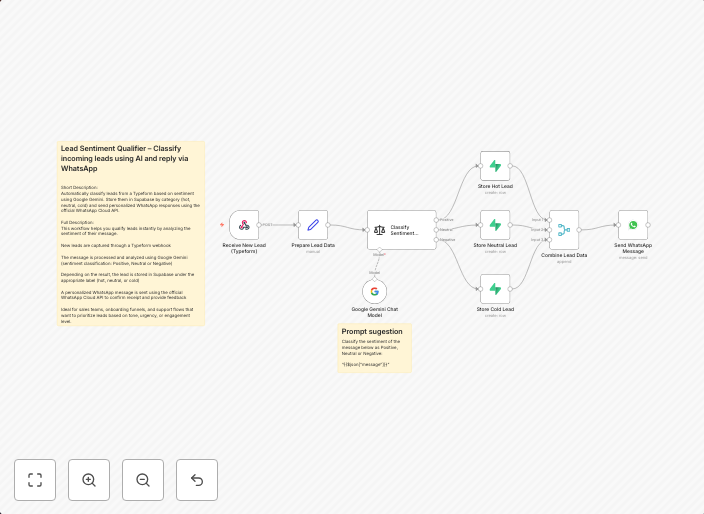
This workflow uses Google Gemini to analyze the sentiment of incoming lead messages and classify them accordingly. It then stores the classified leads in Supabase by category and sends tailored WhatsApp responses via Typeform. This automation helps businesses streamline their lead generation process and respond to leads more efficiently.
Who Should Use This
This workflow is ideal for businesses, marketing teams, and lead generation professionals who want to leverage AI-powered sentiment analysis to improve their response rates and customer engagement.
Key Features
- Classifies incoming lead messages using Google Gemini's sentiment analysis
- Stores classified leads in Supabase by category for easier management
- Sends tailored WhatsApp responses via Typeform to leads based on their sentiment
- Integrates multiple tools for a seamless lead generation process
- Automates repetitive tasks to save time and improve productivity
How to Get Started
To get started with this workflow, import it into n8n and customize the workflow settings to fit your specific use case. Map your lead data and WhatsApp notification settings to get the workflow up and running.
Use This Workflow in n8n →Similar Workflows




Affiliate Disclosure: We may earn a commission if you sign up for n8n through our links. This doesn't affect our recommendations.