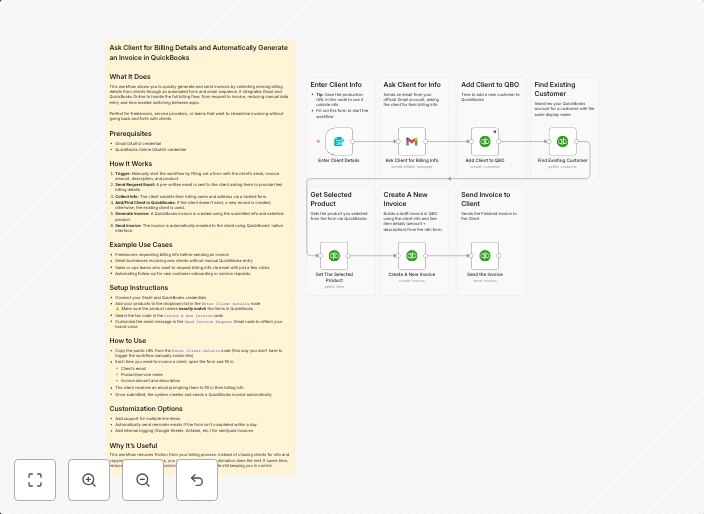
Client billing detail collection & invoice generation with Gmail and QuickBooks
What It DoesThis workflow allows you to quickly generate and send invoices by collecting missing billing details from clients through an automated form and...
Get This WorkflowAbout This Workflow
What This Workflow Does
This workflow streamlines the process of generating and sending invoices by collecting missing billing details from clients through an automated form. It integrates with Gmail and QuickBooks to automate the workflow, eliminating manual data entry and reducing administrative tasks. By automating this process, businesses can save time and improve efficiency.
Who Should Use This
This workflow is ideal for business owners, accountants, and financial managers who rely on QuickBooks for their financial management and want to streamline their invoicing process.
Key Features
- Automated Client Data Collection: Collect missing billing details from clients through an automated form, reducing the need for manual data entry.
- Invoice Generation: Generate invoices directly from the collected client data, using QuickBooks as the accounting system.
- Email Notification: Send invoices to clients via Gmail, ensuring timely and automatic communication.
- QuickBooks Integration: Seamlessly integrate with QuickBooks to create, send, and manage invoices, making it easier to track invoices and payments.
How to Get Started
To start using this workflow, simply import it into your n8n instance and customize the settings to fit your business needs. Configure the Gmail and QuickBooks integrations, and map the workflow to your existing processes for a seamless automation experience.
Use This Workflow in n8n →Similar Workflows




Affiliate Disclosure: We may earn a commission if you sign up for n8n through our links. This doesn't affect our recommendations.