Collect & store restaurant customer feedback with Google Sheets and email forms
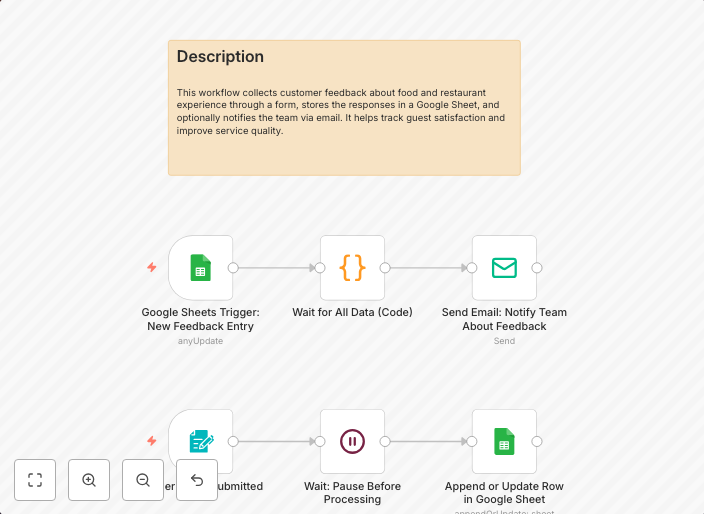
This n8n template demonstrates how to create an automated customer feedback collection system for restaurants. The workflow triggers when new customer...
Get This WorkflowAbout This Workflow
What This Workflow Does
This n8n template automates the collection of customer feedback for restaurants by triggering when new customer feedback is submitted through email forms. The workflow then stores this feedback in a Google Sheets spreadsheet for easy analysis and review. This helps restaurants to gather valuable insights and improve their customer experience.
Who Should Use This
This workflow is ideal for restaurant owners, marketers, and developers who want to streamline their customer feedback collection process and gain valuable insights from customer feedback.
Key Features
- Collects customer feedback from email forms: This workflow triggers when new customer feedback is submitted through email forms, making it easy to collect feedback from customers.
- Stores feedback in Google Sheets: The workflow stores the collected feedback in a Google Sheets spreadsheet, allowing for easy analysis and review.
- Automates customer feedback collection: This workflow automates the collection process, saving time and effort for restaurant owners and staff.
How to Get Started
To use this workflow, import it into your n8n instance and customize the email form and Google Sheets integration to fit your specific needs. Follow the workflow's documentation and tutorials to set up email forms and Google Sheets, and start collecting customer feedback in no time.
Use This Workflow in n8n →Similar Workflows




Affiliate Disclosure: We may earn a commission if you sign up for n8n through our links. This doesn't affect our recommendations.