Compare SQL datasets
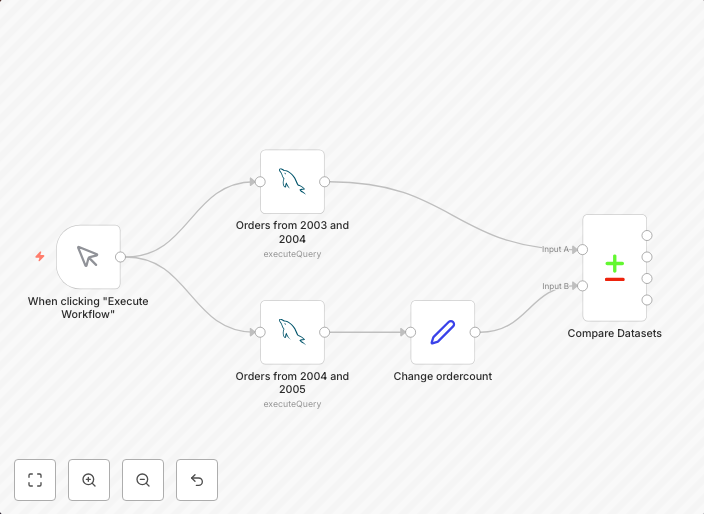
This workflow compares 2 datasets from a single database. Two SQL nodes create a slightly different summary report based on the payments table. Both reports...
Get This WorkflowAbout This Workflow
What This Workflow Does
This n8n automation workflow compares two datasets from a single database, generating two summary reports based on the payments table. The reports are created using SQL nodes, allowing for precise control over the data extraction and analysis. The workflow enables users to easily identify differences and changes between the datasets.
Who Should Use This
This workflow is designed for database administrators, data analysts, and engineers who need to monitor and analyze changes in their database's payments table. It's ideal for those who want to automate the process of comparing datasets and generating reports.
Key Features
- Automated Data Comparison: The workflow creates two summary reports from the payments table, allowing users to easily identify differences between the datasets.
- Customizable SQL Queries: Users can modify the SQL nodes to tailor the report generation to their specific needs.
- Efficient Data Analysis: The workflow streamlines the process of comparing datasets, saving time and effort for users.
How to Get Started
To use this workflow, simply import it into your n8n instance and customize the SQL nodes to match your database schema. You can then run the workflow to generate the comparison reports and analyze the results.
Use This Workflow in n8n →Similar Workflows




Affiliate Disclosure: We may earn a commission if you sign up for n8n through our links. This doesn't affect our recommendations.