Comprehensive SEO Audit with GPT-4 Specialists using Analytics, Search Console & PageSpeed
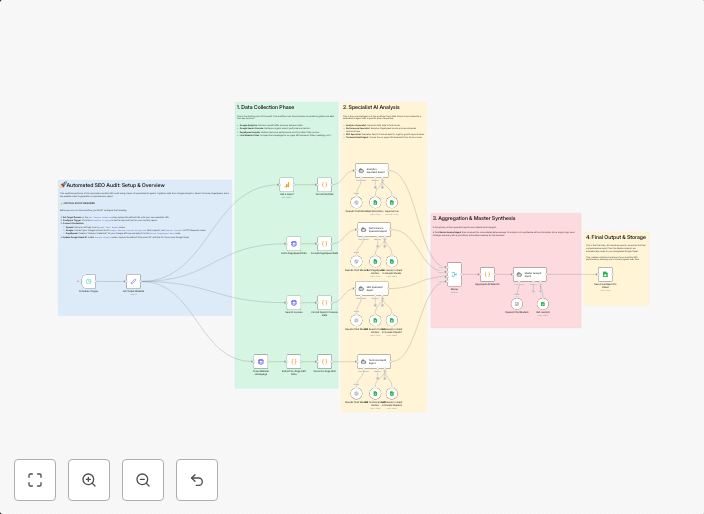
🤖 Automated SEO Audit with a Team of AI Specialists This workflow performs a comprehensive, automated monthly SEO and performance audit for any website. It...
Get This WorkflowAbout This Workflow
What This Workflow Does
This workflow automates a comprehensive SEO audit for any website, analyzing data from Analytics, Search Console, and PageSpeed to provide a thorough assessment of a site's performance. It leverages GPT-4 specialists for AI-driven insights and recommendations. The audit is designed to be performed on a monthly basis, helping users stay on top of their website's SEO and performance.
Who Should Use This
This workflow is ideal for web developers, marketers, and business owners who want to optimize their website's search engine ranking and performance without manually collecting and analyzing data.
Key Features
- Analytics Analysis: Retrieves and analyzes data from Analytics to understand website traffic, engagement, and conversion metrics.
- Search Console Insights: Collects and interprets data from Search Console to identify issues with search engine indexing, crawl errors, and more.
- PageSpeed Optimization: Analyzes website loading speed and provides recommendations for improvement using PageSpeed insights.
- GPT-4 AI Summarization: Utilizes GPT-4 specialists to provide AI-driven summaries and recommendations for improving website SEO and performance.
How to Get Started
To use this workflow, import it into your n8n instance and customize the node settings to suit your website's specific needs. You'll need to connect your Analytics, Search Console, and PageSpeed accounts to the workflow, then schedule it to run on a monthly basis for seamless SEO audits.
Use This Workflow in n8n →Similar Workflows




Affiliate Disclosure: We may earn a commission if you sign up for n8n through our links. This doesn't affect our recommendations.