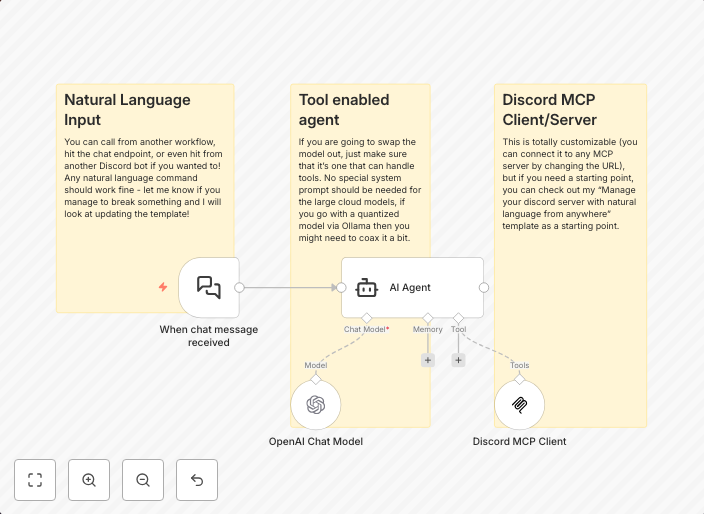
Control your discord server with natural language via GPT4o and MCP Client
What it is-Very simple connection to your Discord MCP Server and 4o. How to set it up-Just specify your MCP Server's url, select your OpenAI credential, and...
Get This WorkflowAbout This Workflow
What This Workflow Does
This n8n automation workflow connects to your Discord MCP Server and GPT-4o, enabling natural language control of your Discord server. With this workflow, you can interact with your server using voice or text commands, automating various actions and tasks in your Discord community. This integration simplifies server management and enhances user engagement.
Who Should Use This
This workflow is ideal for Discord server administrators, community managers, and developers who want to create a more interactive and dynamic community experience. It's also suitable for businesses and organizations using Discord for customer support or internal communication.
Key Features
- Connects to your Discord MCP Server and GPT-4o for natural language control
- Automates various actions and tasks in your Discord community
- Enables voice and text commands for streamlined server management
- Enhances user engagement and interaction with your community
How to Get Started
To use this workflow, simply import it into your n8n instance and customize the settings by specifying your MCP Server's URL and selecting your OpenAI credentials. From there, you can start exploring the possibilities of natural language control and automation in your Discord server.
Use This Workflow in n8n →Similar Workflows




Affiliate Disclosure: We may earn a commission if you sign up for n8n through our links. This doesn't affect our recommendations.