Convert Slack messages to Notion todos using 📝 emoji reactions
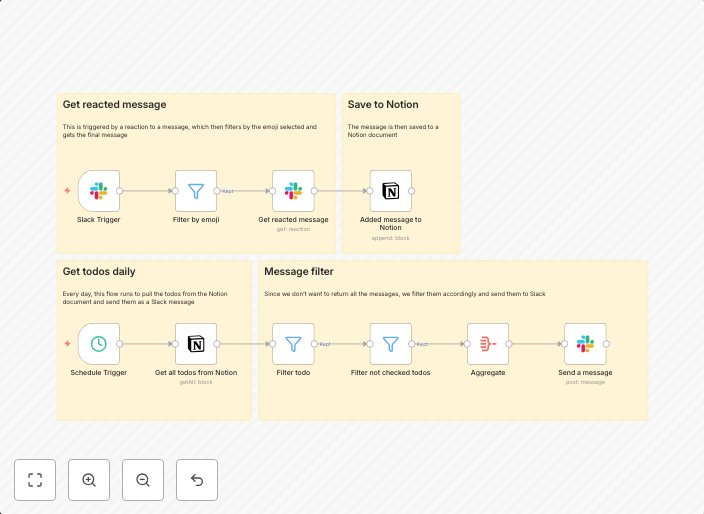
This n8n workflow turns Slack messages into actionable Notion todos — using nothing more than a simple emoji reaction. By reacting to any Slack message with...
Get This WorkflowAbout This Workflow
What This Workflow Does
This n8n automation workflow enables you to transform Slack messages into actionable Notion todos by reacting to them with a specific emoji. This simple yet powerful tool streamlines your workflow, allowing you to easily turn conversations into actionable tasks. By automating this process, you can stay organized and focused on your projects.
Who Should Use This
This workflow is ideal for developers, marketers, and business owners who rely on Slack for team communication and Notion for project management. Whether you're a solo freelancer or part of a large team, this automation saves you time and effort by turning informal discussions into structured tasks.
Key Features
- Convert Slack messages to Notion todos: React to any Slack message with a designated emoji to turn it into a Notion todo.
- Seamless communication to task creation: Automatically transform conversations into actionable tasks, keeping your project management organized.
- Simple setup and customization: Easily import and customize the workflow to fit your team's specific needs.
- Effortless task management: Focus on your projects without worrying about manually creating tasks from Slack messages.
How to Get Started
To use this workflow, import it into your n8n instance and customize the settings to match your Slack and Notion integrations. Once set up, start using the designated emoji reaction to turn Slack messages into Notion todos and experience the benefits of streamlined project management.
Use This Workflow in n8n →Similar Workflows




Affiliate Disclosure: We may earn a commission if you sign up for n8n through our links. This doesn't affect our recommendations.