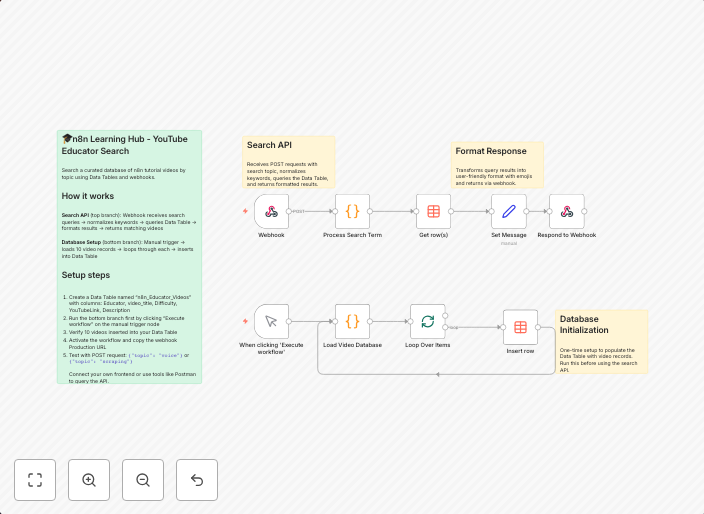
Create a searchable YouTube educator directory with smart keyword matching
🎓 n8n Learning Hub — AI-Powered YouTube Educator Directory 📋 Overview This workflow demonstrates how to use n8n Data Tables to create a searchable...
Get This WorkflowAbout This Workflow
What This Workflow Does
This workflow creates a searchable YouTube educator directory with smart keyword matching, allowing users to easily find and connect with educators on the platform. It utilizes n8n's Data Tables to store and organize the directory, making it easily accessible and up-to-date. The workflow also incorporates AI-powered keyword matching for efficient filtering and discovery.
Who Should Use This
This workflow is ideal for developers, marketers, and business owners who want to create a comprehensive directory of YouTube educators and streamline the process of finding and featuring relevant content creators.
Key Features
- AI-Powered Keyword Matching: Efficiently filters and discovers relevant educators based on keywords and categories.
- Searchable Directory: Easily accessible and up-to-date directory of YouTube educators, organized using n8n's Data Tables.
- Automated Data Collection: Collects and updates educator data from YouTube, reducing manual effort and ensuring accuracy.
How to Get Started
To use this workflow, import it into your n8n instance and customize the settings to match your specific requirements. You can then use the workflow to create your own searchable YouTube educator directory and start discovering new content creators.
Use This Workflow in n8n →Similar Workflows




Affiliate Disclosure: We may earn a commission if you sign up for n8n through our links. This doesn't affect our recommendations.